


The LogicMark Freedom Alert Max is a unique two-in-one cell phone and medical alert. We tested it hands-on to find out of it's a worthwhile purchase, and honestly, we're impressed. It boasts tons of thoughtful safety features, like sensitive fall detection, geofencing, and emergency video calls. In this review, we'll explain how we tested the LogicMark Freedom Alert Max, how it performed, and who might consider buying it.
LogicMark Freedom Alert Max Review
Does the thought of calling a medical alert monitoring center make you nervous? With the LogicMark Freedom Alert Max, you can choose to call a caregiver instead.

Why you can trust SafeWise
products considered
250+
research hours in 25+ in-home tests
10k+
years of combined experience
176+
homes and people protected
10M+
For over 13 years, SafeWise experts have conducted independent research and testing to write unbiased, human reviews (not robots). Learn more.

 7 min read
Cathy has been a leading expert in medical alert systems and other senior safety products since 2021. She has also written about dementia and aging for publications like SELF.com, The Beacon Newspapers, My Health Teams, and more. Cathy holds a certificate in gerontology and takes an evidence-based, hands-on approach to reviews.

Pros
 Accurate fall detection
Flexible settings for emergency calls: monitoring center, caregiver, or crisis lifeline
Caregivers can schedule when they're on call
Live video feed and GPS location available to caregivers during emergency calls
Excellent audio and video quality
Integrated flashlight
Monitoring center agents answer calls quickly
Accurate fall detection
Flexible settings for emergency calls: monitoring center, caregiver, or crisis lifeline
Caregivers can schedule when they're on call
Live video feed and GPS location available to caregivers during emergency calls
Excellent audio and video quality
Integrated flashlight
Monitoring center agents answer calls quickly 
Cons
 Automatic fall detection waits a long time (2 minutes) before calling monitoring center
Comes with a lanyard that's too long, causing device to get in the way and cause some false alarms when fall detection is enabled
Automatic fall detection waits a long time (2 minutes) before calling monitoring center
Comes with a lanyard that's too long, causing device to get in the way and cause some false alarms when fall detection is enabled How much does the LogicMark Freedom Alert Max cost?
The LogicMark Freedom Alert Max costs a one-time activation fee of $54.99. There's no separate device fee. If you buy it from Amazon, the activation fee is charged as the purchase price.
The monthly cost ranges from $54.99 to $79.96, depending on whether you choose optional features. We've listed those prices in the table below. A free 3-month trial of fall detection and geofencing is included with each Freedom Alert Max.
Info current as of post date. Offers and availability may vary by location and are subject to change.
Yes, but it's really up to your local VA. According to LogicMark, "veterans may be eligible to receive a Freedom Alert Max at no cost if it is available through their local VA and prescribed or approved by their provider."
LogicMark told us they're working with VA facilities nationwide to expand access to the Freedom Alert Max.
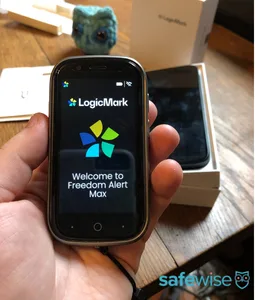
Summary of our hands-on testing experience
Fall detection: Responsive and accurate with some minor issues
The LogicMark Freedom Alert Max detected a fall every time we dropped or slid the device, provided it hit a hard surface. If it hit a soft surface like a couch, it bounced and didn't trigger an alert. We also wore the device and attempted to fall forward from a seated position. We're not exactly stuntpeople, but our efforts were enough to trigger a fall alert in this sensitive device.
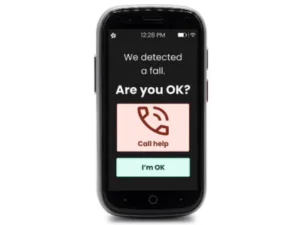
We love how the Freedom Alert Max loudly announces a fall within one second of hitting the floor. It doesn't leave you wondering whether the device worked or not. You'll have the option to tap the screen to call for help or to cancel the alert.
Our only complaint is how long it takes to call the monitoring center if you do nothing. Let's say you've fallen because you're having a seizure or you've fainted. You won't be able to press the button to confirm you need help. The device will wait two minutes before placing a call to the monitoring center. That's a long time, especially when every second counts in an emergency.
📣 Update: LogicMark told us they've already lowered the wait time from three minutes and plan to lower it again in an upcoming software update. Users will still have time to cancel if needed.
The Freedom Alert Max's sensitivity is definitely a good thing, but it can lead to some false alarms. Sometimes it would bang into things while we were wearing it, and the impact would be mistaken for a fall. For example, it hit my knee when I got up from the floor, and later it smacked against the washing machine.
Wearing fall detection devices over the breastbone can help prevent false alarms by keeping them out of the way, but we couldn't get the provided lanyard short enough. You may need to use a different lanyard for the best fit.
📣Update: LogicMark plans to offer a redesigned lanyard in the future.
Whether you've fainted or feel dizzy and confused after a fall, fall detection is a safeguard that can quickly summon help to your side. You don't have to press any buttons or even speak into the device. Sensors inside the device trigger a call on your behalf, and monitoring center agents are trained to send first responders to your location if you're unresponsive.
However, fall detection devices don't necessarily react to every fall. We've read dozens of first-hand accounts from people who bought a fall detection device that failed to protect them or their loved one during a scary situation. It can be devastating to put your trust into a device that fails to deliver.
That's why we take hands-on testing seriously. There's no perfect fall detection device on the market that detects 100% of falls, but testing helps us identify the top performers.
Keep reading: What is fall detection?
With the LogicMark Freedom Alert Max, we began our fall detection tests by following the instructions in the user manual. It suggests dropping the device onto a soft surface from a height of several feet. We dropped the Freedom Alert Max onto a couch, and it bounced but didn't trigger an alert. This method didn't seem to replicate a real fall, so we moved on to another strategy.
This time, we dropped the Freedom Alert Max onto a rug from about chest-height. Immediately, the device loudly announced that it had detected a fall. The screen lit up with the option to call for help or cancel. We repeated this several times with the same results each time.
Dropping the device onto a rug simulates a hard fall, but sometimes people are able to catch themselves on furniture or drop to their knees, which slows their descent. Would the Freedom Alert Max respond to those falls too? For this test, we slid the device across the rug, sort of like throwing a bowling ball. The Freedom Alert Max responded each time.
And to satisfy our curiosity, we also wore the device on the provided lanyard and attempted to "fall" by quickly moving from a seated position to a face-down position on the floor. Again, the Freedom Alert Max responded each time.
Fall detection is available in the LogicMark Freedom Alert Max for an additional $9.99 per month.
GPS location: Private until there's an emergency
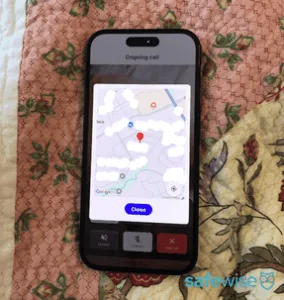
Caregivers can see the current location of the Freedom Alert Max during an emergency call. Image credit: Cathy Habas, SafeWise
The LogicMark Freedom Alert Max is designed for active individuals who may need help on-the-go. It includes a GPS tracker so that first responders or caregivers know where to find you during an emergency, even if you're unable to communicate or don't know where you are.
Many mobile medical alert systems allow caregivers to view the device's location at any time, but LogicMark chose to protect the user's privacy by limiting access to GPS data. Caregivers can only view the device's location during an emergency call. Caregivers can also set up geofencing alerts (also called safe zone alerts) to get a general idea of the user's activity, but they won't be able to see their exact location.
Monitoring center agents also have access to the Freedom Alert Max's GPS data during an emergency. When we placed test calls to the monitoring center, we asked each agent to confirm our location. We did this at three different residential addresses. The agents provided the correct address in two instances, but in the third test call, the agent provided the address of the house behind us.
If you spend time alone at more than one address, consider filing those addresses with LogicMark so that monitoring agents have a better idea of where you might be if you're unable to speak.
Monitoring center response: Fast answer times, clear audio
We believe it's important for monitoring center agents to quickly answer emergency calls. When medical alert devices ring and ring and ring, anxiety can set in. Is the device working? Is anyone going to answer? Am I going to get help in time?
LogicMark's monitoring center agents answered our test calls in an average of 35 seconds. In my experience, this is actually quite fast. I have sometimes waited more than 90 seconds for someone to answer when testing other medical alert devices.
An icon is shown on the Freedom Max Alert screen when a call is being placed, and the screen turns red when an agent connects. All of the agents were easy to understand and had a friendly attitude. Their voices sounded crystal clear, and they confirmed that they could hear us as well. The LogicMark Freedom Max Alert is one of the few medical alert devices I've seen with volume controls, so you can make the call louder or softer as needed.
Caregiver features: Smart and innovative
The LogicMark Freedom Alert Max goes above and beyond to equip caregivers with remote monitoring tools. Here are some of the things caregivers can do in the Care Village app:
- Schedule shifts so that emergency calls can be directed to different caregivers at different times, easing the burden of responsibility.
- Remotely access front-facing and rear-facing cameras on the Freedom Alert Max during an emergency call, which helps them gather more information about what's going on.
- See the device's current location during an emergency call.
- Initiate a three-way call with the monitoring center.
- Set up medication reminders.
- Create geofences (costs an extra $9.99 per month).
- Monitor battery life and activity level (step count).
- Enable "simple calling" so that one tap is all it takes to call a caregiver or the monitoring center.
- Receive notifications whenever a fall is detected or the monitoring center is called, and view a timeline of these notifications.
- Manage more than one device.
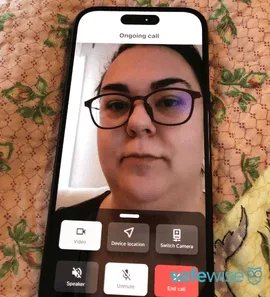
On an emergency call, caregivers can view live video from the front and back cameras on the Freedom Alert Max. Image credit: Cathy Habas, SafeWise
We're especially impressed with the video calling capabilities. Both cameras provided high-quality visuals with no grainy feeds or annoying lags. Note that it's not a two-way video call — the Freedom Alert Max user won't be able to see you. Monitoring center agents can't access the cameras, only caregivers.
The ability to collaborate with more than one caregiver and to even schedule caregiver shifts also helps to address the serious issue of caregiver burnout. It's a thoughtful touch that shows how much care was put into the Freedom Alert Max's design.
However, the app could use a few changes to make it more user-friendly. We had a hard time finding the menu that allows caregivers to change call settings, add geofences, and more. Expect to consult the user manual a few times.
📣 Update: LogicMark welcomed our design feedback and said they're already working on an in-app tutorial to help caregivers find important settings without having to reach for the manual.
Integrated cell phone: Cuts down on device clutter
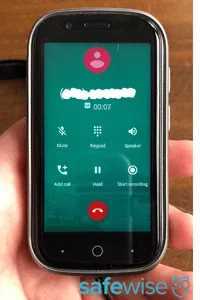
For an extra $20/month, the Freedom Alert Max doubles as a cell phone. Image credit: Cathy Habas, SafeWise
For an additional $20 per month, the Freedom Alert Max doubles as a cell phone. This reduces the need for an extra device and may encourage some people to wear a medical alert system. Users can call saved contacts or access a dial pad to call any number. During a call, a menu displays the following functions:
- Mute
- Keypad
- Speaker
- Add call
- Hold
- Record
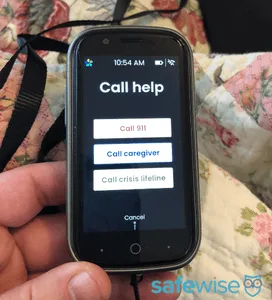
When simple calling is disabled, users can choose from three help options. Image credit: Cathy Habas, SafeWise
The extra cell phone fee isn't required for the Call Help button. When simple calling is disabled, the Call Help button shows three options:
- Call 911 (this goes to the monitoring center, not your local 911 dispatcher)
- Call caregiver
- Call crisis lifeline (988, suicide prevention line)
When simple calling is enabled, the Call Help button automatically calls a caregiver or the monitoring center, depending on which setting is selected in the Care Village app.
If the caregiver doesn't respond in two and a half minutes, calls are automatically forward to the monitoring center.
LogicMark Freedom Alert Max vs. other mobile medical alerts
The LogicMark Freedom Alert Max is in a league of its own. To our knowledge, it's the only mobile medical alert system that allows people to call a caregiver rather than the monitoring center. It's also the only device that prevents caregivers from seeing its location until an emergency occurs. Other features, like video calling, caregiver shifts, an a flashlight, are practically unheard of in other medical alerts.
Below, we offer a quick comparison of the LogicMark Freedom Alert Max and two top medical alert brands: Bay Alarm Medical and Medical Guardian.


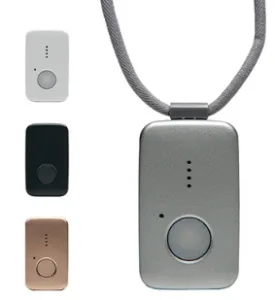
Prices as of post date. Offers and availability may vary by location and are subject to change. Read full Amazon disclaimer.
How we reviewed the LogicMark Freedom Alert Max
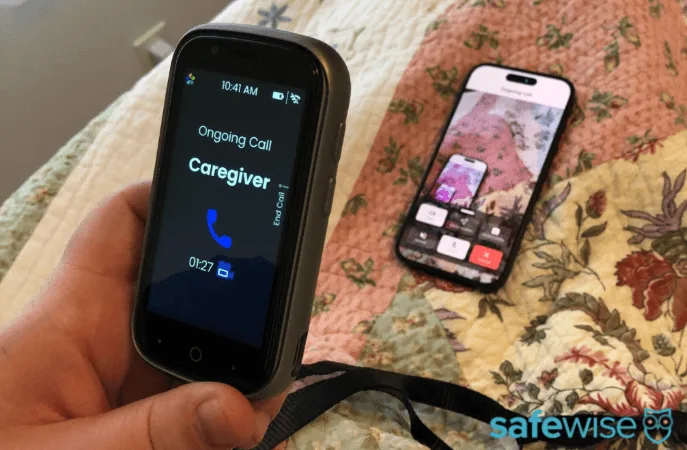
Testing the rear camera on the LogicMark Freedom Alert Max. Image credit: Cathy Habas, SafeWise.
To prepare our LogicMark Freedom Alert Max review, we tested the device and Care Village app hands-on. LogicMark loaned us a Freedom Alert Max and caregiver phone that had already been configured, so we weren't able to test ease of set up. Here's how we tested the device:
- Wore the device on the provided lanyard to evaluate comfort and convenience.
- Dropped the device on hard and soft surfaces to mimic falls and test fall detection.
- Wore the device while "falling" out of a chair to test fall detection.
- Practiced cancelling calls.
- Placed emergency calls to the caregiver phone and enabled video and location features.
- Placed test calls to the monitoring center, timed how long we waited for an answer, and asked the agent to confirm our GPS location.
- Used all other features, including medication reminders, flashlight, and dial pad.
- Charged device and observed its battery life with normal use.
Learn more about how we test and review products on the SafeWise methodology page.
Final word
Although we encountered some minor hiccups while testing the LogicMark Freedom Alert Max, we believe this is a reliable, high-quality product overall. It offers a refreshing take on medical alert systems, and we hope it pioneers a new wave of tech that's useful for caregivers and care partners alike.
- Go ahead and buy the LogicMark Freedom Alert Max if you want a mobile device that can call caregivers or a professional monitoring center, or if accurate fall detection is a priority.
- Keep shopping if you're on a slim budget and don't mind sacrificing some features to keep costs low.
Disclaimers
*Product prices and availability are accurate as of post date and are subject to change. Any price and availability information displayed on Amazon at the time of purchase will apply to the purchase of this product. Safewise.com utilizes paid Amazon links.
Certain content that appears on this site comes from Amazon. This content is provided “as is” and is subject to change or removal at any time.


Recent Articles

Jury Finds Meta and YouTube Negligent in Landmark Social Media Addiction Case
Meta and YouTube were found negligent in a landmark addiction case. Here’s why it matters...

How Safe Are the Fastest-Growing U.S. Cities?
Does a surge in population lead to a surge in crime? Find out in our...
Package Theft and Cybercrime Are Now the Most Common Crimes in America
State of Safety data shows Americans are more likely to experience package theft and cybercrime...
Alternatives to ADT Home Security Systems (2026)
Not sure ADT is right for you? Discover the best home security systems with flexible...


