Does the Wiley Buddy work as expected?
For the most part, yes. Audio sounds great from the Wiley Buddy's microphone and speakers, and the ringer is loud and unique. (It would be nice to be able to adjust the volume of the ringer, though.)
However, I did run into a few hiccups. The biggest one allowed incoming and outgoing calls from unknown numbers, which means the phone's key safety feature wasn't working. According to an email sent to all Wiley customers, this was a widespread glitch that was fixed soon after launch.
Unfortunately, the fix didn't seem to work for me, so I reached out to Wiley customer service. They did a great job keeping me in the loop, and a couple days later I was unable to place a call to an unapproved number. Hooray!
Growing pains are to be expected with any new device. Here are a few more issues I noticed.
Call history isn't always accurate
Call history logs show the call's date and time, duration, whether the call was inbound or outbound, the other party's phone number, and who hung up first.
However, I noticed these logs weren't always accurate.
- Some inbound calls were incorrectly labelled as outbound.
- Sometimes the Wiley Buddy's phone number was listed instead of the other party's number. I don't need to know that the Wiley Buddy made a phone call — that's already implied.
Voicemail inbox never updated
You're supposed to have access to voicemails via the Wiley parent portal. Go to the Voicemail tab and scroll down to Voicemail inbox. I used my cell phone to call the Wiley Buddy and leave a voicemail, but it never appeared in the voicemail inbox.
I chose to receive an email any time someone left a voicemail, and I got that instantly. It didn't transcribe the message, but it did attach the audio clip so I could listen to the message.
Voicemail setup was a bit confusing
After setting up a voicemail PIN in the parent portal, you can press the envelope icon on the phone to listen to and manage voicemails. The prompts here could use some work. The first time you access this area, it asks you to immediately say your name and record a message, but it's unclear if you're recording a greeting. Later, it tells you to press a number to manage greetings and walks you through different prompts in order to do so.
I couldn't hang up the phone at first
The first thing I did on the Wiley Buddy was access the voicemail menu. I used speakerphone mode to make it easier to use the keypad while listening to prompts. When I was finished, I returned the handset to the cradle ... but the phone didn't hang up. I could still hear the voicemail menu rattling off through the speaker. I picked up the receiver and tried again, but it kept happening.
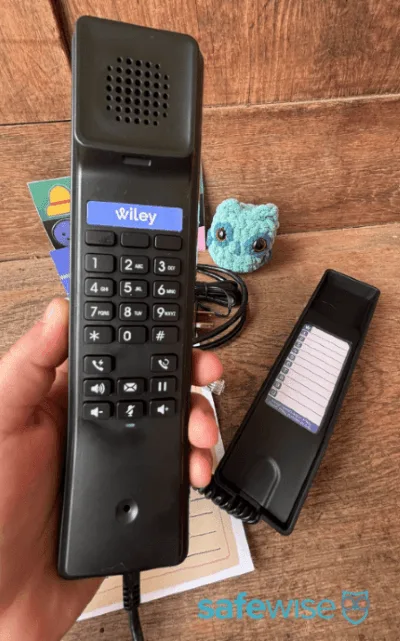
There's no physical button on the cradle that allows you to hang up the phone. It must sense that the handset is on the cradle. After panicking slightly and pressing all the buttons to try to hang up the phone, I firmly placed the handset on the cradle to ensure a tight connection between whatever sensors lie below. That worked. Phew!
I didn't run into any other problems after that, but I've been firmly hanging up the phone ever since.
I got a mysterious phone call
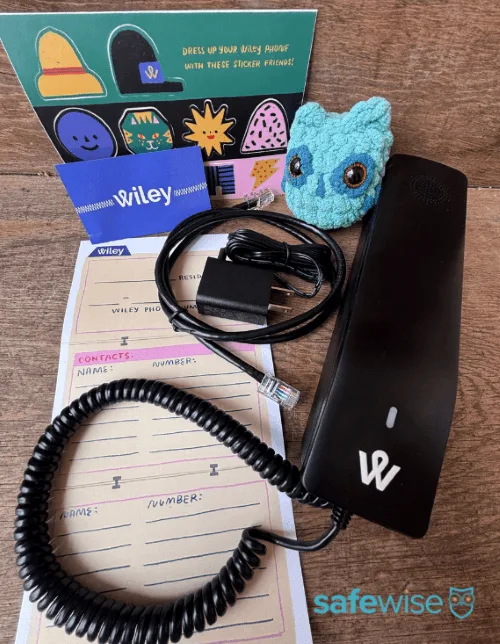
There are a few buttons on the Wiley phone that didn't work as expected when I first pressed them.
- The pause button (it doesn't confirm that your caller has been placed on hold, and the elevator music that plays on the other end starts off very soft and quiet)
- The redial button (it didn't seem to work the first few times I pressed it)
- The lightning bolt button (customer service told me it's called the flash button and is used for three-way calls)
I may have gotten a little overzealous in pressing buttons to try to make them all do something. When I hung up the phone, it immediately started ringing. Huh? I just made this number! And I have parental controls!
When I answered, a robotic voice said something to the effect of, "You have reached the limit," then hung up.
It was a little creepy and unexpected. I don't think it means this phone is unsafe for kids, but be aware that a younger child might get scared if this happens.





 6 min read










 Your Privacy Choices
