Cathy, a Safe Sleep Ambassador, specializes in family safety, simplifying complex topics for trusted sites like Safety.com with 11+ years of writing experience.
Wingio is a kids phone currently available only in the UK. Designed by former Samsung engineers, Wingio parental controls exist at a device level and can't be be uninstalled by your child — not even if they get hold of your phone.
I tested Wingio hands-on to see if I could crack it. Although I did find some loopholes with web browsing, they're easily dealt with by choosing stricter settings. Overall, we're impressed by Wingio and believe it's an excellent choice for UK parents who want to safely introduce their child to a smartphone.
Pros
Parent-approved contacts
Full text content available to parents
Camera can be disabled
Screen capture available
Geofencing and location tracking
Variety of scheduling and browsing controls
Cons
No notifications about bullying or mature content
No location history
Parents need to be careful not to allow internet browsers other than Chrome
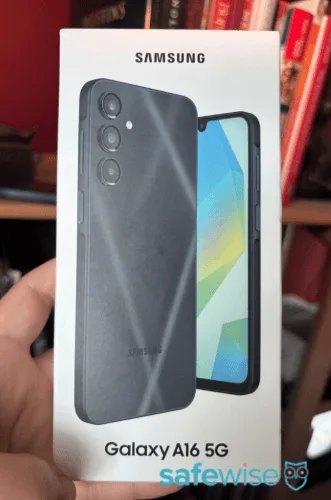
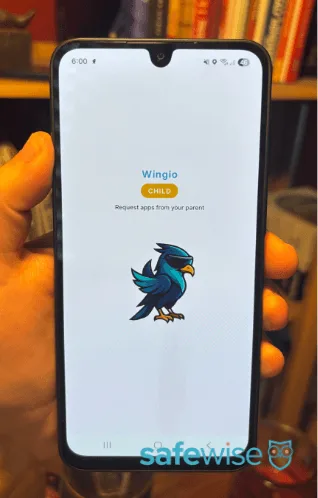
What's in the box?
Image credit: Cathy H., SafeWise
Wingio is Samsung Galaxy A16 4G, A16 5G, or A17 5G phone with Wingio's parental controls baked into the hardware.
You'll get the phone, a USB-C charging cord, and a SIM key. Wingio doesn't come with a SIM card or a wall adapter for the charger.
What does Wingio do?
Does Wingio have the parental controls you're looking for? Let's find out. (I'll talk about how well the features work below.)
Communication controls:
Add contacts or approve contact requests.
View full text conversations.
View call history, including incoming, outgoing, and missed calls.
Toggle off Wingio Dialer, which turns off all communication restrictions and restores the phone's dial pad, contact list, SMS, and Google Messages. (This could be useful if your child turns 18 and wants to continue using the phone.)
Allow all incoming and outgoing calls and SMS. (Not recommended for children, but may be useful as your child gets older and needs to accept calls from potential employers, colleges, etc.)
Location-tracking:
Schedule location updates every X minutes, starting at every 5 minutes.
Create and color-code geofences (safe zones) with a minimum radius of 50 meters.
Program a geofence for entry alerts and/or exit alerts.
View detailed geofence alert history.
Easily activate or deactivate a geofence alert.
App restrictions:
Search for, install, and delete apps from parent phone.
View the child's app requests.
Disable app requests altogether.
Set time limits for each app.
Web restrictions:
Block the Google Chrome web browser entirely.
Set daily limits for Chrome.
Change the default Chrome homepage to a different URL.
Block all websites except for the ones you add to the allow list.
Allow all websites except for ones you add to the block list.
Turn on Safe Browsing to protect against malware, phishing, and other cybersecurity risks.
Turn on the Safe Sites filter to block explicit images and adult content.
View each website visited and instantly block them as necessary.
Usage limits:
Schedule "sleep mode" to block phone access at night or during school.
Instantly toggle sleep mode on or off as needed.
Wingio plan to launch additional restriction mode schedules (daily limits and app restrictions) soon.
Limit the total number of minutes the device can be used before all apps are disabled.
Other controls and features:
Turn off hotspot capabilities to prevent USB tethering and Bluetooth sharing.
Choose from three restriction levels (full access, partial blocking, full blocking) for the child's Settings menu.
View a timeline of activity and daily, weekly, or monthly usage reports.
Remotely lock or reboot the phone.
Take remote screenshot of the phone.
Toggle the camera on or off.
View battery level and internet connection status.
Wingio is built into a Samsung Galaxy, not installed on it. That's an important difference because kids can usually find a way to uninstall parental controls, but it's virtually impossible to get rid of hardware like Wingio.
Still, I did my best to find a way around each setting. Wingio worked well overall, but parents need to take some extra steps to block graphic content online.
Here's an overview of what I learned during testing.
Kids can't get around sleep mode, but it's a little too restrictive
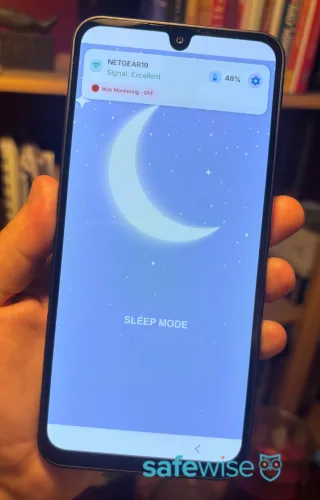
Sleep mode completely shuts down the phone. Kids see an image of a moon, the phone's battery level, WiFi connection, and web monitoring status. Although there's also a settings button and a back button, neither work.
I tried to prevent sleep mode by changing the phone's date or time, but the phone shut down exactly when it was supposed to.
I like the strict approach, but I think kids should be able to do three things in sleep mode:
See the date and time
Edit alarms
Call at least one emergency contact or 999
This would allow the phone to double as an alarm clock and lets kids get help in an emergency.
Wingio sleep mode locks down the phone so that kids can only see a few details, like battery life.
Share:
Image credit: Cathy H., SafeWise
App restrictions work correctly, but parents need to pay attention
Although you'll see the Google Play icon on your child's Wingio, they can't actually access it. To search for apps, they'll need to access the Wingio child app. Once they tap the download button, they'll see a message that says, "Are you sure?" and gives them the option to cancel or to request download.
Parents, you'll take it from there. If you approve a request, you can set up time limits for the app. And if an approved app ever becomes problematic, you can delete it any time.
Pay close attention to the apps your child requests. I noticed some apps, like Facebook and Reddit, didn't show up in search, but I was able to find adult apps like Tinder or Grindr. So, your child might request things that aren't age-appropriate. View our list of dangerous apps for kids to know what to look for.
I also recommend rejecting any extra web browsers because Wingio can only block URLs on Google Chrome.
Web browsing is safest when parents lock it down
With Wingio, you can choose exactly how relaxed or strict you want to be with your child's internet access. Google Chrome is the default web browser, and it's the one you have to use if you want to block websites.
You have three main options:
Disable Chrome completely for kids who are too young to be online.
Block all websites (place an * in the block field) and only allow certain ones, like sites your child needs for school. This also blocks Google search results.
Allow all websites but block certain ones that you don't want your child to visit, and enable safe search features to filter adult content out of Google image results.
If you choose option three, know that your child can definitely still view adult/mature/explicit content online.
The safe browsing features limit what shows up on Google search, but Google isn't the only search engine on the internet. Your child might try to get around content filters by using other search engines.
To test this, I went to Yahoo.com on the Wingio phone and searched for mature content. I was shown a warning about safe search filters, but then I had the option to turn those filters off. The images that appeared definitely weren't appropriate for kids. I would add Yahoo.com to the block list.
I searched for the same thing on DuckDuckGo and Bing. Both refused to show any search results due to the mature nature of my search.
Google, on the other hand, limited its search results to educational sites like medical journals and Wikipedia. However, there are still some explicit images on Wikipedia, and explicit drawings tended to show up in Google's image results. I also noticed that certain websites were available in Google's AI Mode that would otherwise have been blocked by Safe Search.
Speaking of, I would block YouTube.com. I could search for anything and view any video on that site.
On the plus side, Wingio did a great job blocking direct access to porn sites and some social media sites, including Facebook and Reddit. I didn't have to add these sites to the block list — they were automatically blocked in a way that seems unrelated to any other safe search settings. Interestingly, they were blocked on multiple web browsers, not just Google Chrome.
Wingio doesn't alert parents to problematic searches
If you're expecting Wingio to tell you when your child searches for mature or dangerous content, you'll be disappointed. You also can't manually sift through their search history.
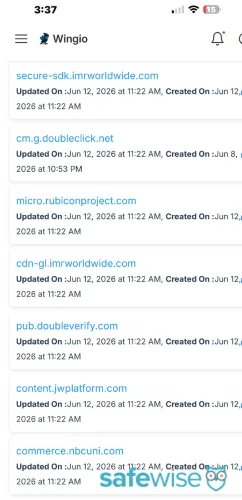
Wingio does display a list of websites that your child has visited, but this isn't a complete picture of your child's internet history. A lot can be seen and read in Google's search results without ever clicking onto another website.
Unfortunately, the browsing history list is difficult to read because it's riddled with nonsense links. I believe these are advertisements that run on other pages. So, for example, if your child visited a local news website that displayed an advertisement for HBO, it would look like your child had visited HBO.
Wingio's web logs seem riddled with random URLs.
Share:
Wingio's web logs seem riddled with random URLs. Screenshot: Cathy H., SafeWise
Limitations of testing
Wingio is a UK phone, and I'm located in the US. As such, I wasn't able to install a SIM card for cellular data, and I couldn't test:
Unknown call blocking
Location accuracy
Geofencing accuracy
I tested all other features over WiFi.
How much does Wingio cost?
There are three costs associated with Wingio:
The upfront price of the phone
The monthly or onetime fee for Wingio
The monthly fee for the SIM card (sold separately)
The upfront price ranges from £149 to £699, but sometimes the phones are on sale for less.
The Wingio fee is the same regardless of which Samsung phone you choose: £7.99/mo., £79.99/yr., or £199 upfront.
The price of a SIM card varies by provider but typically cost £4/mo. to £30/mo.
Two- to four-day shipping is free for orders over £200, but you can pay to get the phone sooner:
£5.99 for 1- to 2-day shipping
£9.99 for 1-day shipping
£15.00 for overnight shipping
Wingio FAQ
Not yet. For now, Wingio is only available in the UK, but the company would like to expand to the US in the future.
Wingio can work for kids of all ages. For younger kids, set stricter web browsing and communication controls. You can relax those controls as your child grows.
Wingio can notify parents when a child enters or exits a safe zone (geofence), but it doesn't send notifications based on search history or text content.
How we reviewed Wingio
Image credit: Cathy H., SafeWise.
Wingio sent SafeWise a phone to test hands-on for this review. I used all features and attempted to find ways to thwart the parental controls, such as by using different web browsers and search engines. Our team also spoke to the founders of Wingio to understand what makes this product unique.
Visit the SafeWise methodology page to learn more about our review process.
Final word: Wingio is an excellent kids phone despite room for improvement
Although I identified several things I would change about Wingio, I still think it's a great phone for kids. Parents have plenty of controls at their fingertips, and Wingio makes a good investment because it can grow with your child.
*Product prices and availability are accurate as of post date and are subject to change. Any price and availability information displayed on Amazon at the time of purchase will apply to the purchase of this product. Safewise.com utilizes paid Amazon links.
Certain content that appears on this site comes from Amazon. This content is provided “as is” and is subject to change or removal at any time.
With over 12 years of experience as a content writer, Cathy has a knack for untangling complex information. Her natural curiosity and ability to empathize help Cathy offer insightful, friendly advice. She believes in empowering readers who may not feel confident about a purchase, project, or topic.
Cathy earned her Bachelor of Arts degree in English from Indiana University Southeast and began her professional writing career immediately after graduation. She has focused on family safety, home guides, and health content since 2021 and earned a gerontology certificate to learn more about the medical side of senior safety. Over the years, Cathy has contributed to sites like SELF.com, SingleCare, My Health Teams, Safety.com, Reviews.com, Hunker, Popular Living, and Thumbtack.






 6 min read








 Your Privacy Choices
