Emily and Cathy are some of the internet's most knowledgeable voices in senior safety tech. Each holds a certificate in gerontology, and they have 9 years of combined experience testing, researching, and reviewing medical alert systems. Both have covered aging and wellness in major publications.
Key takeaways
The LifeStation Pearl performed best overall in our tests.
The LifeStation Sidekick Home had poor fall detection performance.
The LifeStation Sidekick Smart text-to-locate feature was accurate but had poor GPS testing performance when calling the monitoring center.
The monitoring center’s average response time was 42 seconds, one of the fastest we’ve tested.
LifeStation's medical alert systems are simple and easy to use. The brand's superb customer service and fast response times may sway those who are hesitant about medical alert systems. But, some shoppers may find LifeStation's lack of features and mixed performance aren't worth the higher prices.
Overall, we were impressed with LifeStation's fast monitoring center response times, mobile system fall detection, text-to-locate feature, and above-and-beyond customer service. Read on to learn about our full testing experience.
Pros
Mobile systems have accurate, reliable fall detection
Can cancel false alarms on all devices
Superb customer service
Location tracking for caregivers included with both mobile systems
Minimal false fall alarms
Landline system available
30-day money-back guarantee
Spanish medical alert
Owned and operated monitoring center
Cons
At-home range much shorter than advertised
No caregiver app
$100 activation fee for some devices
Here's everything you need to know about LifeStation
LifeStation medical alert systems connect to a 24/7 monitoring center when you press the help button or activate fall detection. A live agent talks with you through the device's two-way speaker and confirms if you need help. Depending on the situation, the agent dispatches emergency responders, a loved one, or both to your location.
LifeStation offers an at-home system for people only needing monitoring at home and two mobile devices that can be used anywhere with cellular connection. It's a pretty standard medical alert company, but LifeStation does have three big differentiators compared to many popular brands:
A mobile system designed for Spanish speakers
Health insurance discounts with eligible plans
An owned-and-operated monitoring center for faster response times
We'll share more details below about LifeStation's features, performance, and perks to help you decide if this medical alert system is right for you.
Is LifeStation reliable? Can I trust it to keep me safe?
Overall, LifeStation medical alert systems are reliable and connect you with highly professional, helpful monitoring center agents. The Pearl mobile system was the most impressive and reliabledevice, detecting nearly all falls and having 100% accurate GPS location tests.
The Sidekick Home and smartwatch performed well overall, but critical features like fall detection and GPS location tracking had mixed results.
The Sidekick Home had the fastest average response time at 31 seconds, but it only detected 2/6 falls and its range was far less than advertised. The Sidekick Smart detected more than half our test falls, but GPS location tracking was inaccurate whenever we tested the device outdoors.
Summary of our LifeStation performance tests
The table below highlights our performance results and biggest takeaways from testing LifeStation. We'll then break down each testing category and our results in more detail.
Fall detection response
Mixed results. The Pearl and Sidekick Smart detected more than half test falls, while the at-home pendant detected 2/6 falls.
Fall detection false alarms
The Pearl and Sidekick Smart had no false alarms, but the Sidekick Home had a few over the course of testing.
GPS accuracy
100% accurate for Pearl, but mixed results for Sidekick Smart.
Monitoring center response
Average response time was 42 seconds, which we consider fast.
Audio quality
Good overall. Audio was loud and clear most of the time, but sometimes cut off with at-home system.
Battery life
All devices lasted all day, if not longer.
Ease of use
Large central buttons and magnetic, adjustable clasps were easy to use and comfortable.
App interface
No app available.
Fall detection: Accurate for mobile systems but not for at-home pendant
We conducted six test falls with each LifeStation medical alert system. The Pearl had the most accurate fall detection with 5/6 successful test falls, and the Sidekick Smart was right behind with 4/6 successful test falls. The Sidekick Home pendant detected just 2/6 test falls. Surprisingly, the pendant with the worst fall detection performance was also the only device that had any false alarms. A sensor that isn’t sensitive enough to detect at least half our test falls but activates when it’s not supposed to (handling it, placing it down, etc.) is unreliable. We can’t recommend fall detection for the Sidekick Home.
We like that both mobile devices have clear verbal and visual cues to indicate when a fall is detected. The home base unit also beeps and announces when fall detection is activated. The device confirms that a fall has been detected multiple times and announces that it's calling the monitoring center. This offers some peace of mind in an otherwise distressing situation, because you'll know right away that the medical alert is working.
If you do accidentally set off fall detection, you can cancel your call either by following the device’s instructions or verbally confirming that you don't need help. If you miss this first cancellation window, just wait for the automated voice to ask if you need help and answer “No” or “Testing.” This is the only way to cancel a false alarm with the home system. If you miss this cancellation window, stay on the call until you reach the monitoring center and tell the agent it was a false alarm — you won't ever be penalized.
Fall detection is a common medical alert feature designed to contact help after a fall, even if you can’t press your button. Fall detection devices have a built-in sensor that measures speed, distance, and direction. When the sensor detects falling conditions, the device calls the monitoring center.
Remember, even the best fall detection devices aren't 100% accurate. Every medical alert brand we’ve reviewed, including LifeStation, cautions users to always press their help button if they can. Fall detection is still a helpful safety feature, especially for those with a high risk of falling.
Fall detection should never take the place of a caregiver.
To test LifeStation's fall detection sensors, we conducted two types of simulated falls for each device:
Hard, fast falls: We held the device at shoulder height and dropped it onto a carpeted floor. This is meant to replicate sudden falls with a hard, fast impact.
Slow, soft falls: We tossed the device onto the same carpeted floor in a slower bowling ball motion. This mimics more gradual falls where the person may catch themselves as they fall.
While both methods aren't true falls, it’s the safest way for us to simulate two common types of falls.
LifeStation's fall detection costs $7.95. If you purchase a system online, this price is bundled with the protection plan for a total add-on cost of $16–$18/month. Call the LifesStation sales team to get fall detection without the protection plan.
GPS location: Reliable caregiver tracking but mixed live results
Share:
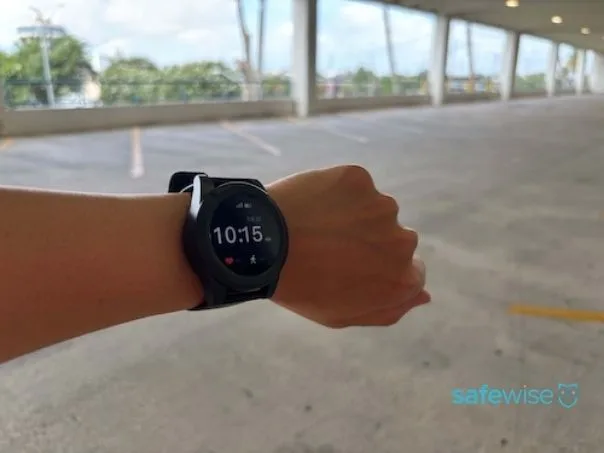
We tested GPS accuracy in multiple locations. Image: Emily Breaux, SafeWise
Mobile systems have built-in GPS tracking so you can get help outside of your home, even if you're unsure of your exact location or are unresponsive. During an emergency, monitoring center agents will dispatch EMS to your mobile device's GPS location — whether that's your home, just around the block, or in another city.
When conducting our GPS tests, we call the monitoring center at three different locations: a tree-lined neighborhood, an open lot, and a parking garage. At each spot, we request our current location from the monitoring center agent. Overall, the Pearl had nearly 100% accuracy on all tests, while the Sidekick Smart had mixed but mostly poor results.
The agent couldn't pull up our location when we tested the Sidekick Smart in the parking garage. After troubleshooting with customer service, we reset the smartwatch and conducted the call again. Now, the agent had our correct location, but the next two location tests were inaccurate. Each location the agent pulled up lagged behind. For example, when testing in the tree-lined neighborhood, the agent pulled up our location in the parking garage.
Whenever we called customer service about this issue, the representative could see our correct location. They weren't sure what was wrong since monitoring center protocol is to refresh the device's GPS location during every call. We conducted multiple successful location tests with the Sidekick Smart's Find My Loved One tracking feature. While we were glad this worked correctly, we were even more confused why the smartwatch's GPS coordinates weren't pulling up correctly during our calls.
Find My Loved One
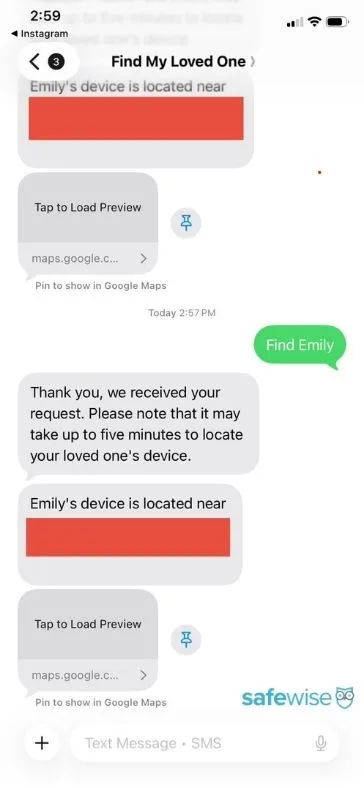
Find My Loved One allows caregivers to receive the current location a mobile device by sending a quick text. This feature is included with both the Pearl and Sidekick Smart, but we could only test the Sidekick Smart.
How does it work? You'll text "Find [user's name]" to a designated phone number and receive a text with the device's location. You can also view the location in your phone's map app if you need context or directions.
Share:
Locate your loved one's device with a quick text message. Image: Emily Breaux, SafeWise
Calling the 24/7 monitoring center is the most critical feature of any medical alert system. LifeStation’s average time to reach an agent was 42 seconds — impressively fast based on our experience. All calls took less than a minute to connect with the monitoring center, which is especially valuable when every second counts during an emergency.
The average response time of all LifeStation devices during testing:
Sidekick Home: 31 seconds
Pearl: 52 seconds
Sidekick Smart: 43 seconds
Each device has clear visual and verbal cues when calling the monitoring center. Whether beeping, ringing, or announcing a call was going through, we were never left in silence wondering when (or if) we were going to connect with a live agent.
Every time an agent answered, they asked immediately if we needed help. After we stated we were testing, the agent would verbally confirm we were testing and double check that we didn’t need help. Each agent followed the same protocol: addressed us by name, asked if we needed help, confirmed we were testing, and also confirmed our home address on file. We appreciate the consistent, professional responses each time.
Audio quality: Strong overall
We observed the quality of each device’s two-way speaker when calling the monitoring center and speaking with an agent. In general, LifeStation’s speakers were loud and clear with a few small blips. The Sidekick Smart had the best, most consistent speaker. We could always hear the agent clearly on every call, even in the parking garage! This is impressive because we've tested other medical alerts that struggle with dropped calls or poor audio in the parking garage. We easily communicated with agents without needing to hold the watch closer to our ears.
The Pearl’s speaker was loud and clear most of the time. We could speak with the agent while the device was still on the ground and we were standing after multiple fall detection tests. The only time the speaker was muffled and low was in the parking garage.
The Sidekick Home speak was very loud, but the audio cut in and out whenever speaking with an agent. The agent’s voice was clipped near the end of most sentences, but it was never enough that we couldn’t understand what they were saying. We could hear the base unit beep and ring throughout our home, and we were able to communicate with the agent nearly 10 feet away from the base unit.
Battery life: Lasts all day and more
Share:
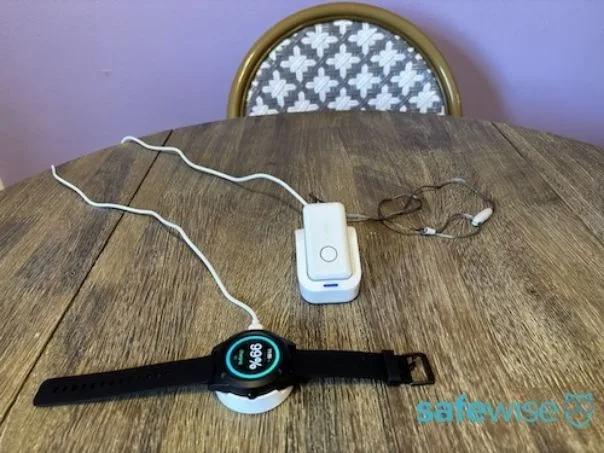
All devices are fully charged before testing. Image: Emily Breaux, SafeWise
LifeStation medical alert systems have the following advertised battery life:
Sidekick Home (32-hour backup battery)
Pearl (up to 3 days)
Sidekick Smart (up to 24 hours)
The Pearl and Sidekick Smart lasted the full advertised battery life, if not longer. The Sidekick Home backup battery didn't last the full 32 hours, dying about 24 hours after we unplugged the base unit.
Even if a medical alert system has a multi-day battery life, we recommend charging it each day.
LifeStation mobile systems take two to five hours to fully charge.
LifeStation's low battery cues could be better. Neither mobile system had an an obvious verbal or light cue that warned us when we needed to charge our devices. The Pearl has small yellow and green light cues, but nothing obvious like a flashing red light or a verbal announcement when the battery is low.
The Sidekick Smart's battery icon is another small visual cue, but you can't see exact battery life percentages until the battery gets dangerously low. We received a warning message on our watch screen when the battery was below 20%, and the watch beeped once before it completely died.
The Sidekick Home pendant has a multi-year battery life, so we only tested the base unit backup battery that kicks in when disconnected from power.The Sidekick Home backup battery lasted less than 24 hours, but the base unit announced periodically that it switched to the backup battery. Although we wish the battery lasted closer to 32 hours, we appreciate the verbal cues to indicate our base unit wasn't connected to power.
How much does LifeStation cost?
LifeStation subscriptions start at $38.95 to $50.95 per month, depending on which device you choose. You can get one month free by paying on an annual basis.
There's a one-time $99.95 activation fee for the Sidekick Home and Pearl system.
Shipping costs $12.50, but LifeStation offers free shipping if you pay on a quarterly or yearly basis.
You may be eligible for a LifeStation discount
LifeStation offers up to a 30% discount to people with certain types of health insurance. Current LifeStation partners include Aetna, UnitedHealthcare, Humana, Wellpoint, Blue Shield of California, Harvard Pilgrim HealthCare, Devoted Health Plans, and more.
Eligibility varies by plan. Call your health insurance provider or LifeStation to see if you qualify.
Click below to compare the cost of each LifeStation device.
Info current as of post date. Offers and availability may vary by location and are subject to change.
Add-on prices and compatibility
LifeStation handles add-ons a little differently. Instead of selecting only what you want, you must choose between a Standard, Select, and Supreme monitoring plan when ordering online. Each one includes different add-ons.
Standard: No protection plan or fall detection
Select: Protection plan only (approximately $8 more than Standard)
Supreme: Protection plan and fall detection (approximately $16 more than standard)
You can only choose between a Select and Supreme plan with the Sidekick Smart.
Update: LifeStation told us that fall detection is available for $7.95 without the protection plan. You must call to get this.
A lockbox is also available with any device and any plan for an additional $2.95 per month.
Other LifeStation fees
You must return all LifeStation equipment within 10 days of cancellation. In its Terms and Conditions document, LifeStation says you'll pay for device repair or replacement if the equipment isn't returned in good condition. A specific dollar amount isn't mentioned.
How does LifeStation compare to other medical alert brands?
Because LifeStation offers just three standard products for higher-than-average monthly fees, it tends to get lost in the shuffle compared to other medical alert companies with much larger catalogs and more enticing policies, like Bay Alarm Medical and Medical Guardian. For example, LifeStation doesn't offer a caregiver app or price lock guarantee. However, it's the only company to offer a Spanish language device (not just Spanish translation services). Plus, LifeStation owns its monitoring center, which gives the company a lot more control over customer service and response times.
Compare LifeStation to other medical alert systems
Info as of post date. Offers and availability may vary by location and are subject to change.
A closer look at LifeStation products
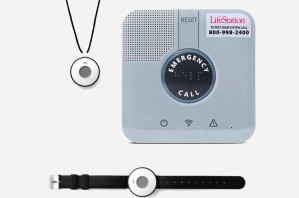
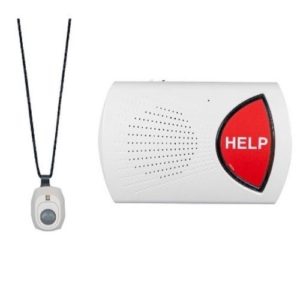
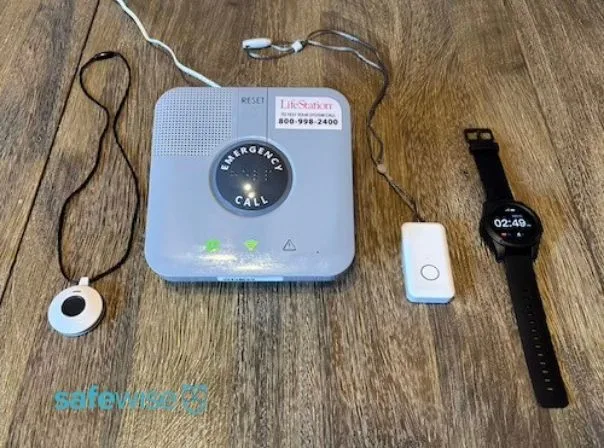
LifeStation offers three main products: a cellular at-home system, a mobile pendant, and a smartwatch. A landline at-home system is also available, but you must call LifeStation to order it.
🏠 = At-home device, 🌞= On-the-go device
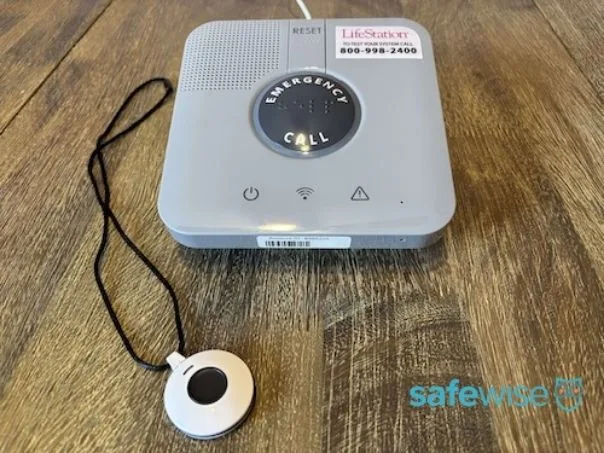
Sidekick Home: Ideal for people who don't leave the house alone
Share:
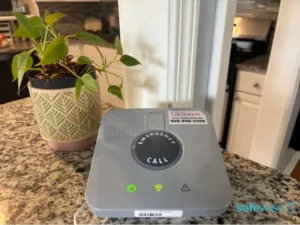
Image: Emily Breaux, SafeWise
LifeStation's In-Home package comes with a base station and a wearable help button. The button itself is about the size of a quarter and has a magnetic clasp, making it easy to take on and off.
The Sidekick Home includes a waterproof necklace or wristband and is advertised to connect with the base unit up to 1,300 feet away, but the actual range was 325 feet when we put it to the test. Obstacles like walls tend to shorten the range of any in-home system, so this is pretty normal.
However, LifeStation stands out as having the longest real-world range of any in-home medical alert we've tested so far. For example, the LifeFone button and Lifeline/Medical alert fall detection buttons only worked up to 65 feet from the base station. This means you'll probably get much better coverage (and peace of mind) when using LifeStation in a larger home or yard.
The at-home system had the fastest response time of all LifeStation products. On average, we connected to the monitoring center within 31 seconds.
You can add a fall detection necklace for $7.95 if you call to order the system. If you order online, you'll need to also pay for a protection plan in order to get fall detection. While $7.95 is one of the more affordable fall detection prices out there, it may not be worth it. Our necklace only detected two out of six falls — not even half our test falls.
The base unit has a 32-hour backup battery that kicks in if the power goes out. Our backup battery lasted about 24 hours, another feature that doesn't live up to the advertised specs. Overall, this at-home system is pretty basic and doesn't stand out much compared to other medical alert systems we've tested. The speedy response time is the Sidekick Home's most impressive feature.
Results from our LifeStation Sidekick Home performance tests
Fall detection response
2/6 successful fall tests. 1 slow and 1 fast fall detected.
Fall detection false alarms
False alarms when handling pendant or placing down.
False alarms can be cancelled.
GPS accuracy
N/A
Monitoring center response
Fast; 31-second average response time.
Audio quality
Very loud, but audio sometimes cut out.
Battery life
Backup battery lasted less than 24 hours.
Ease of use
Lanyard has magnetic clasp but is not adjustable. Buttons central and easy to press.
App interface
No app available.
Who should consider the LifeStation Sidekick Home?
Good for those who want a fast, responsive at-home system without any other features.
Not ideal for people who often leave the home alone or who need reliable fall detection.
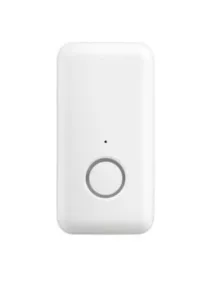
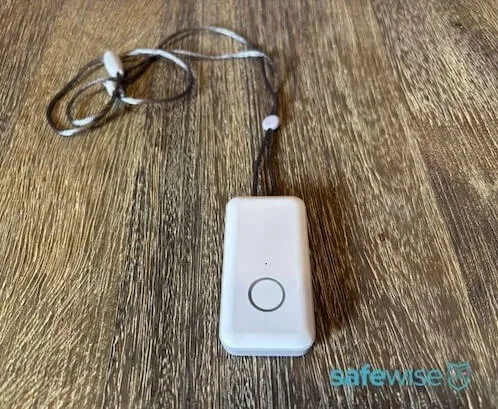
The LifeStation Pearl is a good fit for active older adults who still drive, run errands, or go for walks. It's also great for people whose home or yard is too large for the Sidekick Home's actual 325-foot range
The Pearl consists of a lanyard with a waterproof domino-sized emergency button. It has two-way talk, GPS, and a rechargeable battery that lasts up to three days on a single charge.
Pearl’s super accurate GPS tracking and impressive fall detection stood out the most to us. It detected all but one fall and the agents could see our correct location during every GPS test.
The Pearl comes with Find My Loved One, a text-based location tracker for caregivers. It’s also available as a skill through the Amazon Alexa app. Text it or ask your Amazon Echo to “find my loved one,” and the alert system will locate them through the mobile LTE and GPS features.
Results from our LifeStation Pearl performance tests
Fall detection response
5/6 successful fall tests. 1 slow fall not detected.
Fall detection false alarms
No false alarms.
GPS accuracy
3/3 accurate tests.
Monitoring center response
Fast; 52-second average response time.
Audio quality
Good; could speak with agent while device was on ground during fall tests. Muffled audio in parking garage.
Battery life
Lasts multiple days without charge.
Ease of use
Large central button, magnetic clasp, and adjustable lanyard.
App interface
No app available.
Who should consider the LifeStation Pearl?
Good for active people who want a simple, reliable device with a sleek, modern look or integrated Spanish prompts.
Not ideal for those wanting a more high-tech device with extra features.
Many medical alert companies offer translation services at their monitoring centers, but LifeStation is the only brand offering a device that operates completely in Spanish. Any time the Spanish Pearl "talks" to the user (such as to announce battery level), it's in Spanish.
All setup instructions are also in Spanish, and customer service and monitoring center support is provided in fluent Spanish.
One of our testers is a native Spanish speaker and tested this service to make sure it's easy to understand. She was pleased with her experience overall and says, "The Spanish that was spoken was communicated clearly and concisely. There was no point in which I needed to speak English or the conversation seemed anything but native Spanish."
By threading the Spanish language into every part of the experience, LifeStation allows older adults to feel less anxious about communicating through this device. We love to see this kind of innovation.
Other features include a weather app, location tracking through the Find My Loved One feature, and optional fall detection.
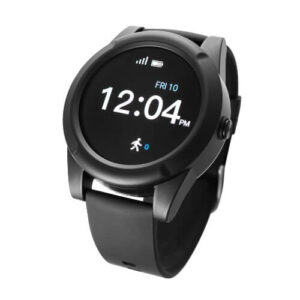
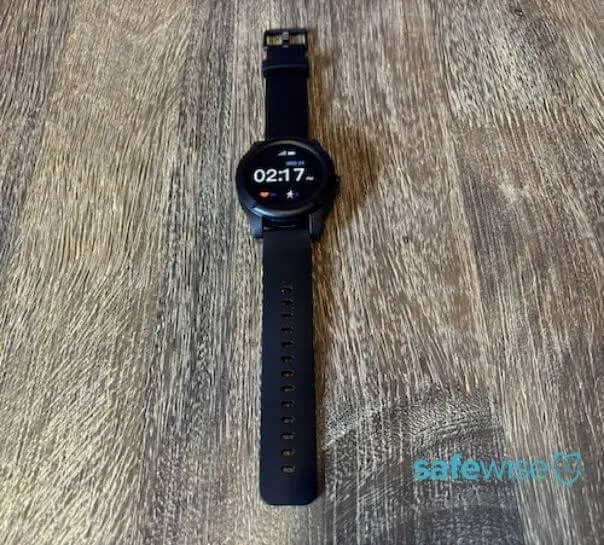
The Sidekick Smart detected more than half of test falls but had unreliable GPS location tracking, a critical feature for any mobile device. This smartwatch is nothing groundbreaking; it’s the same design as other watches we’ve tested and includes similar features.
The watch has a bright and crisp screen that should be easy for older adults to read at a glance. But it's quite large and bulky. One tester noted, "It stands up off my wrist by almost a solid inch. I feel like I'm wearing a ring box on my wrist."
We also don't like that the help button is a small button that blends in with the side of the watch face. It may be difficult for some users to find and press during an emergency, but at least we didn't have to apply to much pressure to successfully call the monitoring center.
The Sidekick Smart is the only LifeStation product without a $100 activation fee.
Results from our LifeStation Sidekick Smart performance tests
Fall detection response
4/6 successful fall detection tests. 2 slow falls not detected.
Fall detection false alarms
No false alarms.
GPS accuracy
1/3 accurate tests.
Monitoring center response
Fast; 43-second average response time.
Audio quality
Excellent; loud and clear audio during every test.
Battery life
Lasts full day without charge.
Ease of use
Help button is small and blends with the touchscreen’s frame. Silicone watch band has large clasp and is easy to adjust.
App interface
No app available.
Who should consider the LifeStation Sidekick Smart?
Good for active people who want a medical alert system that doubles as a fitness tracker.
Not ideal for those easily bothered by bulky, heavy watches.
Yes, LifeStation has a reputation for excellent customer service. The company has earned an average rating of 4.6 out of 5 stars from more than 4,400 customer reviews.
We were impressed by LifeStation’s consistently great customer service during testing. Every representative we spoke with was knowledgeable, patient, and seemed to truly care about helping us. Reps always repeated our issue back to us and made sure they fully understood the problem whenever helping. They also went out of their way to ask how our day was going or if we had a good weekend. These small but warm touches can truly make a difference, especially for users who may be intimidated or hesitant to use a medical alert device.
A real LifeStation Review
"The staff have been above and beyond helpful. I'm 70 and can't see small writing. They gave clear instructions, and waited while I wobbled across the room to find a working outlet. I am very pleased with this company!"
LifeStation has two UL-Listed monitoring centers staffed with trained professionals. These redundant monitoring centers serve customers across the US 24 hours a day, 365 days a year. If one fails, the other will be up and running, so help is never far away.
The gold standard doesn’t stop there. LifeStation is part of the TMA Five Diamond program. It’s less of an award and more of an initiative program where LifeStation agrees to random checks, fewer false alarms, and better service.
Most negative reviews are about cancellation issues or incorrect charges, while a few mention faulty equipment. LifeStation responds to all negative reviews and formal complaints.
LifeStation's refund and return policies
You can cancel your LifeStation service any time, but you’ll only receive a full refund if you cancel within your 30-day trial period. This trial period begins on the date of payment.
If you pre-paid quarterly or annually and decide to cancel, you may be eligible for a refund for any unused service, minus any promotional discounts. LifeStation provides a postage-paid return shipping label.
LifeStation may charge an extra fee of around $300 if you’re unable to return the equipment or it’s damaged.
LifeStation FAQ
Members of these organizations get a discount on LifeStation's monthly monitoring fee:
VFW
AFSCME
Elks Lodge
American Legion
Some health insurance and long-term care insurance plans also offer discounts for LifeStation devices.
Yes. All of LifeStation's wearable alert buttons are water resistant, making them easy to wear in the shower and tub, to the beach, or in the pool.
How we wrote our LifeStation review
Share:
We tested all LifeStation devices over multiple days. Image: Emily Breaux, SafeWise
We tested the LifeStation Sidekick Home with cellular connection, Pearl mobile system, and Sidekick Smart to see firsthand how these devices perform. Although LifeStation sent us free equipment to review and return, our devices weren't pre-activated. We walked through the actual setup experience with a customer service representative.
Here's how we tested each LifeStation device:
Wore devices for extended periods to evaluate comfort, convenience, and ease of adjusting.
Tested the at-home base unit’s range by conducting test calls from the advertised 1,300-foot range and from shorter ranges.
Tested fall detection by dropping devices from shoulder height to simulate fast, hard falls.
Tested fall detection by dropping devices in a rolling motion to simulate slow, gradual falls.
Practiced cancelling calls.
Placed test calls to the monitoring center, timed how long until we reached an agent, and asked the agent to confirm our GPS location.
Placed test calls in different locations and asked the agent to confirm our GPS location.
Used the Find My Loved One text-to-locate feature with the Sidekick Smart.
Fully charged devices and observed battery life with normal use.
Called customer service throughout testing to troubleshoot or ask questions.
We also explored LifeStation's website, including policies and pricing, and combed through real customer reviews. To get an idea of how LifeStation fits into the industry as a whole, we compared the brand to top-rated medical alert systems like Bay Alarm Medical, Medical Guardian, and LifeFone.
Read our methodology to understand how we review and rate products.
Final word: Excellent customer service and fast response times with LifeStation, but devices are pricey and basic
Overall, LifeStation offers a solid mobile system with standard features and an average at-home system and smartwatch, but nothing too special.
The company’s excellent customer service and swift response time — 42 seconds overall — stand out the most. But some may not think LifeStation's limited features are worth the higher monthly prices.
For others, a helpful, friendly voice on the other end and fast response during an emergency are all they need. LifeStation also has a 30-day money-back guarantee so you can try out your medical alert system before fully committing.
We recommend LifeStation if you want a basic medical alert system with outstanding service and don't mind paying a premium price.
We don't recommend LifeStation if you're looking for an at-home system or want more advanced caregiver features.
Emily is passionate about creating helpful, informative content that empowers readers to make more informed decisions about their health, safety, and homes. Since 2022, she’s tested and researched 30+ medical alert systems and written countless product reviews and buying guides to help shoppers navigate the senior safety space.
Emily earned a B.A. in English Secondary Education from Louisiana State University and holds a certificate in gerontology from Delgado Community College. When she’s not writing, she enjoys neighborhood walks, yoga, performing in local musical theatre, and finding her next read. Emily lives in New Orleans with her husband and daughter.







 15 min read











 Your Privacy Choices
