Xfinity Home Security Review

Xfinity Home Security is a good add-on to your Xfinity services. Here’s what our research found.
Best for Xfinity customers
""
Xfinity Home Security
3 out of 5 stars
3
Pro monitoring starts at$45/mo
  • pro
    Financing available
  • pro
    No contract needed
  • con
    Fees for self-monitoring

Info current as of post date. Offers and availability may vary by location and are subject to change.

Why you can trust SafeWise
products considered
250+
research hours in 25+ in-home tests
10k+
years of combined experience
176+
homes and people protected
10M+

For over 12 years, SafeWise has conducted independent research, hands-on testing, and expert consultations to provide trustworthy, human-written home safety advice. Read our methodology.

Alina Bradford
Nov 24, 2025
Icon Time To Read7 min read

Xfinity Home Security allows you to bundle with internet, home phone, mobile, and cable services, which isn’t available with most of the best home security systems. It also has smart home equipment like doorbells, thermostats, and smoke detectors.

Xfinity Home Security does have a few downsides. The research for our Xfinity Home review found that its customer service is lacking. And Xfinity Home Security isn’t available in all areas of the U.S. Here’s what we found after researching Xfinity Home Security and speaking with a real customer.

pro
Pros
pro No contract needed
pro Financing available
pro Smart home features
pro No fees for Xfinity internet equipment
pro Available in 39 states + D.C.
con
Cons
con Not available everywhere
con Fees for self-monitoring
con Poor customer service

Xfinity Home Security cost

Xfinity Home Security offers three equipment packages that range from $360 to $600. You can also pay for your equipment over time, with monthly payments ranging from $15 to $25. This is in line with national averages for home security equipment, but pricier than some DIY  systems like Wyze and Ring.

You can combine any equipment package with either of the two monitoring plans.  And each plan has à la carte options available if you want to add more equipment to your system.

Xfinity’s monitoring plan pricing may vary depending on whether or not you're a new customer. Either way, one perk is that there's no charge for Xfinity's router and modem.

Compare Xfinity Home Security’s monthly costs

Monthly cost
Professional monitoring
24/7 video recording
Advanced video features Icon Tooltip  Dark
Learn More
Xfinity Smart Home
Icon No  LightNo
Icon Yes  LightYes
Icon No  LightNo
Xfinity Home Security
Icon Yes  LightYes
Icon Yes  LightYes
Icon No  LightNo
Xfinity Home Security Plus
Icon Yes  LightYes
Icon Yes  LightYes
Icon Yes  LightYes

Info current as of 11/24/2025. Offers and availability may vary by location and are subject to change.

With Xfinity Home Security, you still begin by selecting the equipment package you need — then you pick the monitoring or self-monitoring plan. All plans include smart-home automation, the Xfinity Home mobile app, and live-streaming video (if you install an Xfinity camera or video doorbell).

What’s available now

  • Self-monitoring (Smart Home / Self Protection): For about $10/month, you get 24/7 video recording (for up to six cameras) and use the app to monitor yourself. Professional monitoring is not included.
  • Professional monitoring (Home Security): For about $45/month (after a discount for auto-pay / paperless billing) you get 24/7 professional monitoring, cellular backup, and cloud video recording.
  • Advanced professional monitoring (Home Security Plus): For an extra $5 per month, you get total home protection that includes 24/7 video recording and advanced AI that detects people, pets, and vehicles.

How Xfinity Home Security compares

When equipment and monitoring costs are combined, you can expect to pay a minimum monthly rate of $25 for the Smart Home plan and $60 for professional monitoring with Xfinity Home Security (if you finance your equipment costs). These prices are competitive with those of other top home security system companies. Our latest data shows the average monthly cost for professional monitoring at $32, with the most expensive package on the market topping out at $99.

Brand
Best for
Lowest monthly price
Starter equipment price
Contract required
Installation
Smart home compatibility
Learn more
Read review
Bundling$360.00
Icon Yes  LightNo
Alexa, Google
Best overall$599.00
Icon Yes  LightNo*
ProAmazon, Google, Z-Wave
Budget pick$245.00
Icon Yes  LightNo
DIYAmazon, Google
Quality DIY pick$129.00
Icon Yes  LightNo
DIYAmazon, Google, Z-Wave
Best customer experienceQuote required
Icon Yes  LightNo*
DIYAmazon, Google

Info current as of post date. Offers and availability may vary by location and are subject to change.

Xfinity Home Security is unique because it’s tied to an internet and TV provider. Systems like ADT and Vivint have an advantage over Xfinity Home because they specialize in home security rather than dividing efforts between cable, internet, and security services.

Sometimes getting everything bundled is convenient. We totally understand. If bundling sounds good to you, you might get a break on costs by signing up for multiple services from Xfinity.

Xfinity Home Security contracts and warranties

Xfinity doesn’t require a contract if you pay for your equipment up front. If you decide to go with a financing plan, you’ll be locked into a contract until you pay off your equipment. The financing terms are for 24 months, so you can plan on being under contract for two years.

There is a one-year limited warranty on Xfinity Home security system equipment, but it’s only for manufacturer defects, not for when your tot pours juice on the keypad. Xfinity can choose to repair the equipment or replace it with a similar item.

Video: Best Home Security Systems 2022 | Best & Worst Parts of Our Top Picks

Play Video

Subscribe to our YouTube channel and learn how to protect your home, loved ones, and belongings.


Comcast Xfinity Home equipment and fees

Xfinity Home Security offers a decent selection of equipment to outfit your home. It starts with three different package sizes. Then you can build on to your package with indoor, outdoor, and doorbell cameras, smoke detectors, a smart thermostat, a smart outlet controller, or more sensors and motion detectors. You can get all this installed for around $100. Or you can install some components yourself for free.

Compare Comcast Xfinity Home equipment packages

Monthly cost
Home size
Equipment
Learn more
Base Home System$15/mo. for 24 mo. or $360 one-time feeSmall homes/apartmentsControl panel, 3 door/window sensors, motion sensor
Complete Home System$20/mo.for 24 mo. or $480 one-time feeMedium-sized home with multiple outside doorsControl panel, 5 door/window sensors, 1 motion sensor, 1 wireless keypad, 1 HD indoor/outdoor camera
Ultimate Home System$25/mo. for 24 mo. or $600 one-time feeLarge homesControl panel, 10 door/window sensors, 1 motion sensor, 1 wireless keypad, 2 HD indoor/outdoor cameras

Info current as of 11/24/25. Offers and availability may vary by location and are subject to change.

What’s in the box

Image credit

Xfinity Home Security devices

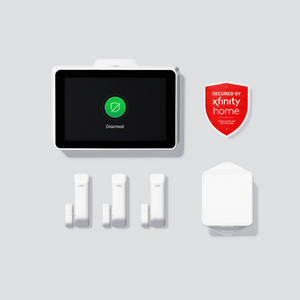
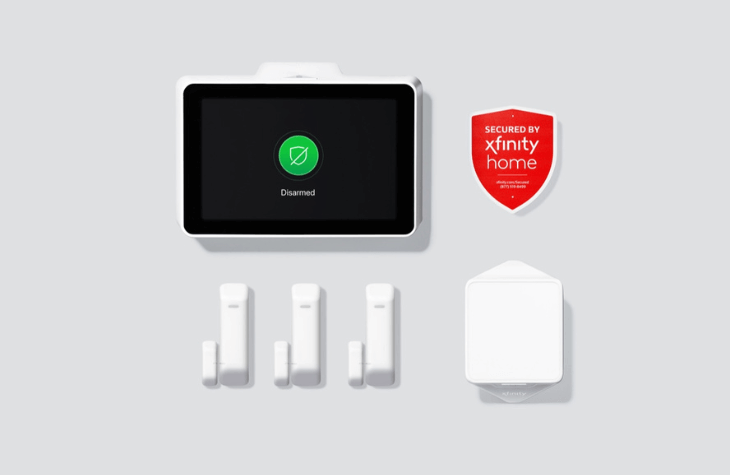
The Base Home System includes what you need for a small home or apartment:

  • 1 touchscreen control panel
  • 3 door/window sensors
  • 1 motion sensor
  • Battery and cellular backup system
  • Xfinity Home Security yard sign

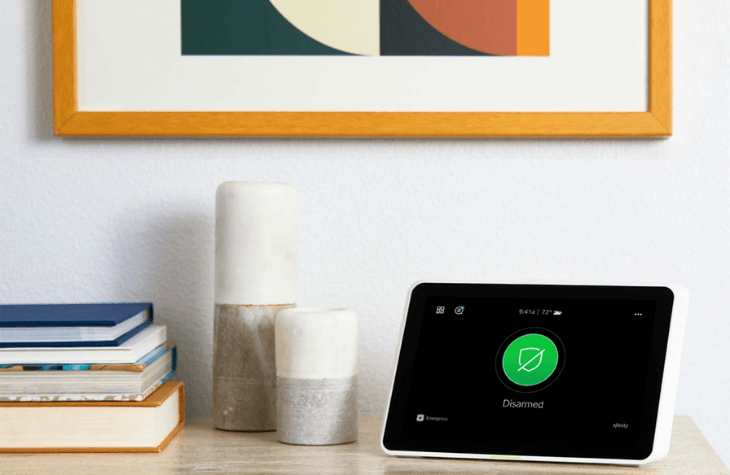
Xfinity Home Security has all the essentials needed for a reliable alarm system. The starter kit comes with three door/window sensors, a touchscreen control center, a cellular backup system to keep your system running when the phone lines or Wi-Fi is down, and a wireless keypad to arm and disarm your system. Plus, you can control your system with the Xfinity Home app.

What we’re most impressed with is the motion sensor with a sky-high weight range. This pet immune sensor will ignore moving objects up to 85 pounds. (That’s double the limit of most sensors!). It’s a helpful feature if you have a large dog or kids because they won’t trigger the sensor and cause a false alarm.

You can also add extras like the indoor/outdoor camera, smart thermostat, smoke detector, or outlet controller to gain extra control over your home through the Xfinity Home app.

You could watch a live stream from the Xfinity camera, warm your living room with the thermostat when you come home from work, and keep a light on with the outlet controller.


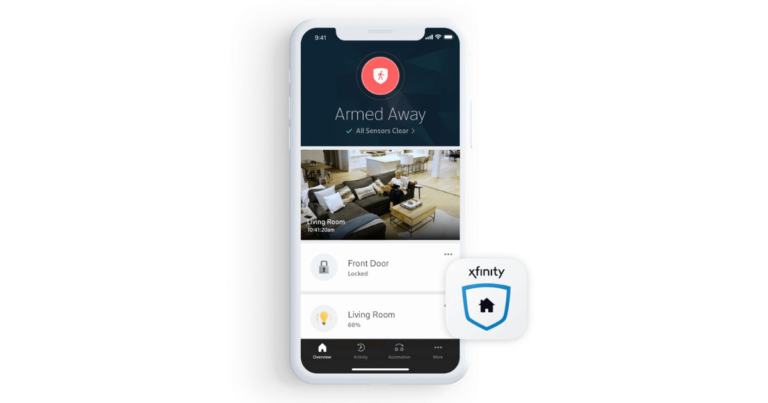
On the app you an arm your system and turn on lights

Xfinity Home setup and installation

In some cases, you can install Xfinity Home Security equipment yourself, but it usually requires professional installation. If you’re a first-time Xfinity customer or if it’s been over a year since you’ve had an Xfinity system, you’ll have to go with the pros. Advanced systems with more than four pieces of equipment will also need to be set up by a professional.

Professional installation costs around $100, but it’s a one-time payment. And scheduling an installation appointment is easy. Xfinity provides a clear timetable of available times and dates, including weekends, so you won’t have to take time off work to let the tech in for installation.

Installation techs promise they’ll arrive within two hours of your scheduled appointment time, and if they don’t, you’ll get a $20 credit. If you have an existing security system from another company, the same Xfinity professionals can take a look at your system to see if it’s compatible or needs to be upgraded.

Xfinity Home Security smart home features and compatibility

Xfinity partners with third-party smart home providers like August, GE, Philips, and Ecobee. Equipment from these companies, like smart lighting, locks, and thermostats, can work with your Xfinity Home system.

You can control your Xfinity Home Security system through its mobile app or web portal. From here, you can watch live feeds, control your thermostat, and check on the system when you get alerts. You can also arm your system using voice control with Amazon Alexa and Google Assistant.

One feature that stands out from other security systems is the TV feature. You can watch your camera feeds, arm your system, and create smart home automations through your television with voice commands using the optional TV Control with Xfinity X1.

Xfinity Home Security customer service and support

Joy, the Xfinity customer we spoke with, spoke about the “pushy” sales tactics she experienced with the company: “When I called last time, there was a lot of pressure.” Upgrades were always a point of conversation when on the phone with an Xfinity rep.

She also said getting in touch with a real person could be a challenge. She’d find herself on hold frequently when she tried contacting Xfinity with questions.

Joy’s experience isn’t rare for Xfinity customers. We encountered similar stories from customers online — customer reviews on sites like ConsumerAffairs  and Trustpilot give low stars compared to other systems we've reviewed.

Is Xfinity Home Security right for you?

If you’re already on the Xfinity bandwagon for cable and internet, Xfinity Home Security is a nice perk to add to your existing setup. It's also a good choice if you’re looking to bundle your home security with other valuable home services. Not many other companies can bundle services like Xfinity.

Comcast Xfinity Home Security FAQ

Monthly, you can expect to pay between $10 and $45 minimum, depending on your equipment and monitoring plans.

If you’re looking for home security, we think ADT comes out on top. Unlike Xfinity, ADT focuses on home security instead of bundling services like internet, TV, and phone service. All this multitasking from Xfinity leads to poor customer service and confusing contracts.

But ADT isn’t perfect either. Read our review on ADT home security to learn more.

With Xfinity Home Security, you pair your monitoring plan with an equipment plan. After professional installation, your devices communicate wirelessly with a central hub, allowing you to watch and control your home system from the Xfinity app. You can check security camera footage, change the thermostat temperature, and arm your system remotely.

Xfinity Home Security works with plenty of third-party smart equipment devices. Here are some examples:

  • Caseta Wireless lighting
  • August door locks
  • Chamberlain garage door openers
  • Sengled lighting
  • Philips Hue lighting
  • Kwikset door locks
  • GE lighting
  • Ecobee thermostat
  • Cor thermostat
  • Lifx lighting
  • Yale door locks
  • Tile locators

Yes. Prices will vary, but expect a minimum of $10 per month for just the Xfinity Smart Home service. You may be able to bundle home security with TV and internet from Xfinity for a better price.

Yes. Xfinity Home offers security cameras designed for indoor and outdoor use, plus a video doorbell camera. Its outdoor cameras are weather-resistant and take crisp HD live video, night or day. An Xfinity installation professional can help you find the right spot to place your security camera inside or outside.

Yes, if you choose one of the two professional monitoring plans, your Xfinity Home system is monitored 24/7 by trained monitoring professionals. Having the pros on your side speeds up response times from emergency responders and can minimize false alarms.

How we reviewed Xfinity Home Security

""

Image: SafeWise. 

We started research on Xfinity Home Security at the source, poking through the website’s packages, plans, and fine print. We used our decades of experience in safety and security to compare the service to other top security system brands on the market.

To get an accurate firsthand account of Xfinity Home Security, we interviewed a real customer. From customer service to equipment, Joy told us about her experience of using Xfinity Home Security for three years.

We also compared her experience to Xfinity Home Security customer reviews across the web.

Read our full methodology to learn more about how we reviewed Xfinity Home Security and other home alarm systems like it.

Related articles on SafeWise


Disclaimers

*Product prices and availability are accurate as of post date and are subject to change. Any price and availability information displayed on Amazon at the time of purchase will apply to the purchase of this product. Safewise.com utilizes paid Amazon links.

Certain content that appears on this site comes from Amazon. This content is provided “as is” and is subject to change or removal at any time.

Google, Google Nest Secure, [any other related Google Products] and other related marks are trademarks of Google LLC.

Alina Bradford
Written by
Alina is a safety and security expert with over 25 years of experience. She has contributed her insights to CNET, CBS, Digital Trends, MTV, Top Ten Reviews, and many others. After testing thousands of devices, apps, services, and more, her goal is to make safety and security gadgets less mystifying one article at a time. In the early 2000s, Alina worked as a volunteer firefighter, earning her first responder certification and paving the way to her current career. Plus, she has tested hundreds of pieces of security and safety equipment over the years. Places published: CBS, MTV, CVS, Rachael Ray, eBay, Reader’s Digest, ConsumerAffairs, and more. Certifications: Fire Service Training, Oklahoma State University. Awards: Received the Experience Leader certificate from Authority, putting her “in the top 25% among the thousands of professional content creators analyzed by Authory for the Fall 2023 audit.” You can view more of Alina's work at alinabradford.com.

Recent Articles

kids in booster seats on cell phones
Best Booster Seats of 2026
We recommend the Britax Highpoint or the Chicco MyFit as the top booster seats of...
Best Baby Cribs
Best Baby Cribs of 2026
Choose the best baby crib for your little one. SafeWise reviews the seven best convertible...
solar powered light on house
Best Solar-Powered Security Lights of 2026
Find the best solar-powered lights, cameras, and light/camera combinations of 2025. Stay safe (and green!)...
driveway-with-closed-garage-doors
Best Driveway Alarms and Sensors of 2026
YoLink is our top pick for the best driveway alarm of 2026. See how it...