Wyze Home Monitoring Review 2026

We tested how Wyze Home Monitoring compares with other DIY security systems—spoiler alert, it's a sweet deal.
Best budget pick
WYZE
Wyze Home Monitoring
3.8 out of 5 stars
3.75
  • pro
    Affordable equipment
  • pro
    No contract
  • con
    No cellular backup
Monitoring plan
Price
Monthly
Annual

Info current as of post date. Offers and availability may vary by location and are subject to change.

Why you can trust SafeWise
products considered
250+
research hours in 25+ in-home tests
10k+
years of combined experience
176+
homes and people protected
10M+

For over 13 years, SafeWise experts have conducted independent research and testing to write unbiased, human reviews (not robots). Learn more.

Alina Bradford
John Carlsen
Jul 10, 2026
Icon Time To Read11 min read
Icon CheckReviewed ByRebecca Edwards

With 25+ years in tech journalism, Alina blends safety expertise with her passion for simplifying technology. Alina has tested hundreds of safety and security devices, is trained as a first responder, and has worked as a volunteer firefighter.

Is Wyze Home Monitoring right for you?

Wyze Home Monitoring has the most affordable professional monitoring of any security system on the market. There's no cellular backup, but that's a worthwhile tradeoff for monitoring that costs less per month than most streaming services.

Keep reading to learn how Wyze Home Monitoring performed during our tests and what else we like about the DIY security system.

pro
Pros
pro Most affordable monitoring
pro Free hub with Annual Plan
pro No contract
pro 10-hour battery backup
pro Cheap security cameras
con
Cons
con No cellular backup
con Doesn't come with a camera
con Short warranty
con Weak smart home support

How Wyze Home Monitoring stacks up against competitors

If you're comparing home monitoring systems, Wyze is the one to check out first for pure affordability. Monitoring runs $4.99 a month, and kits start at $49.95 — cheapest setup cost on the list, hands down. It connects with Amazon Alexa and Google Assistant, so it'll fit into most existing smart home setups without any headaches.

Kangaroo takes the "cheap monthly bill" crown, at $1.99 a month, though you'll pay more upfront for the kit at $279. What you're really paying for there is sensor quality — Kangaroo's known for having some of the best sensors in the game. It also plays well with Alexa and Google Assistant.

Abode is the one I'd point smart home nerds toward. At $8.49 a month and $159.99 to start, it's not the cheapest, but it works with practically everything — Alexa, Google Assistant, Apple HomeKit, Z-Wave, and Zigbee. If your house is a patchwork of different smart devices from different brands, Abode is built to make them all talk to each other.

Then you've got Ring and SimpliSafe, which cost more but bring more to the table depending on what you need. Ring Alarm runs $45 a month with kits starting at $199.99, and it's marketed as the budget pick — which feels a little funny given that price tag, but the equipment and reliability seem to justify it for a lot of buyers. It supports Alexa and Z-Wave. SimpliSafe sits at $22.80 a month and $250.96 for a kit, and it's the one that gets singled out for monitoring quality. It also works with Alexa and Google Assistant.

Bottom line, if you want cheap and simple, go Wyze or Kangaroo. If you're already knee-deep in smart home gadgets, Abode's compatibility is hard to beat. And if monitoring quality is your top priority, SimpliSafe earns that reputation for a reason.

Brand
Best for
Monitoring price
Equipment price*
Smart home compatibility †
Learn more
Read review
Wyze Home Security System Core KitAmazon Alexa,
Google Assistant
Best budget security systemAmazon Alexa,
Z-Wave
Best sensorsAmazon Alexa,
Google Assistant
Best for smart homesAmazon Alexa,
Apple HomeKit,
Google Assistant,
Z-Wave, Zigbee
Best monitoringAmazon Alexa,
Google Assistant

*Amazon.com list price as of post date. Read full disclaimer.
†Some Wyze products (like cameras) are compatible with Amazon Alexa and Google Assistant, but Wyze Home Monitoring is not. Read the smart home section of this review for more details.


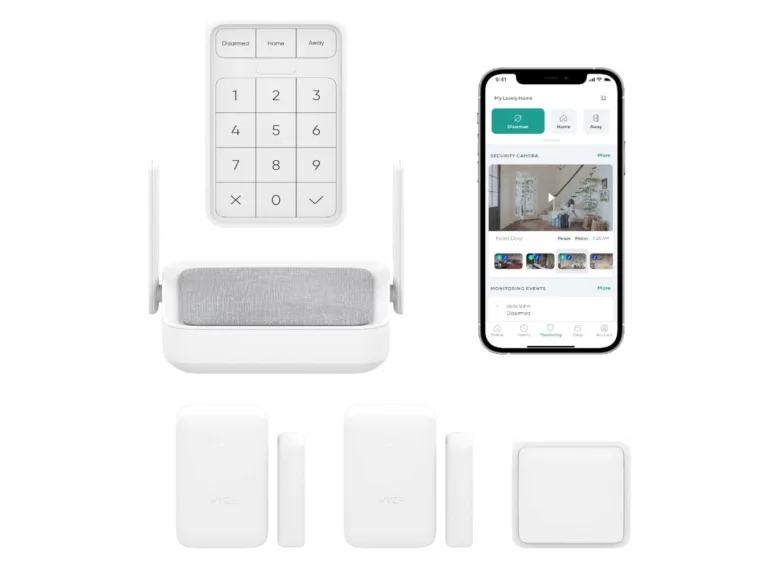
Wyze Home Security System Core Kit

Image: Wyze

Wyze monitoring prices

Wyze keeps things pretty simple with four plan tiers, and the differences mostly come down to how many cameras you're covering and whether you want an actual human on the other end during an emergency.

Wyze Cam Plus is the entry-level option at $2.99 a month. It's self-monitored, meaning you're the one keeping an eye on things, and it only covers a single camera. There's no emergency dispatch built in, so if something happens, you're the one making the call — literally.

Step up to Wyze Cam Unlimited at $9.99 a month, and you get the same self-monitoring setup, but now it covers unlimited cameras instead of just one. Still no emergency dispatch, though. This one's really for people who've got multiple cameras around the house and don't want to pay per device.

Wyze Cam Unlimited Pro bumps the price to $19.99 a month, and this is where things get more serious. You still get unlimited camera coverage, but now emergency dispatch is included. So if a sensor trips or something looks off, you can call for emergency services using your Wyze app.

Then there's Wyze Home Monitoring, priced at $9.99 a month. This one flips from self-monitoring to professional monitoring, meaning a real monitoring team is watching for you. Basically, for the same price as the self-monitored unlimited plan, you get a professional team watching your back instead.

So the real decision point here is whether you want to monitor things yourself or pay for someone else to do it. If you're comfortable checking your phone and handling things yourself, the self-monitored plans get the job done. But if you want backup — someone who'll actually call for help when it matters — Wyze Home Monitoring is where you'll want to land.

Monitoring plan
Monthly fee
Monitoring
Number of cameras covered
Emergency dispatch
Learn more
Self1
Icon No  LightNo
SelfUnlimited
Icon No  LightNo
SelfUnlimited
Icon Yes  LightYes
ProfessionalUnlimited
Icon Yes  LightYes

Wyze Home Monitoring equipment

Wyze's monitoring prices are pretty affordable, but the equipment costs about the same as other top home security companies' offerings.

You can save money by going on Amazon and buying a bundle. Unfortunately, you have to take whatever comes in the bundle you choose. On Wyze's site, you can choose what goes into your system, piece by piece.

The upside to buying on the company's site is that it offers an 18-mo extended warranty. Plus, the hub is free if you purchase an annual monitoring subscription. 

Wyze used to include the Core Starter Kit with the annual plan, but the company switched it up.

Here's a look at Wyze's home security equipment.

  • Wyze Sense Hub: The hub manages the sensors and sounds a siren when something triggers an alarm. It also connects to the internet to enable the Wyze mobile app. You can get it on the Wyze website for around $60.
  • Wyze Sense Keypad: The keypad controls the system's arming status and allows users without mobile app access to disarm the system. On the Wyze site, the keypad costs around $40.
  • Wyze Sense Motion Sensor: The motion sensor uses infrared light to spot people moving through a room. It's around $25 on the Wyze site.
  • Wyze Sense Entry Sensor: The entry sensor uses magnets to tell if the door or window it's attached to is open or closed.
  • Wyze Sense Climate Sensor: The climate sensor measures temperature and humidity in your home. It runs around $45 on the site.
  • Wyze Sense Leak Sensor & Probe: You can put this by your toilet, washing machine, or sink, and it will tell you when it leaks, helping you avoid costly repairs. You can get it on the site for around $16.

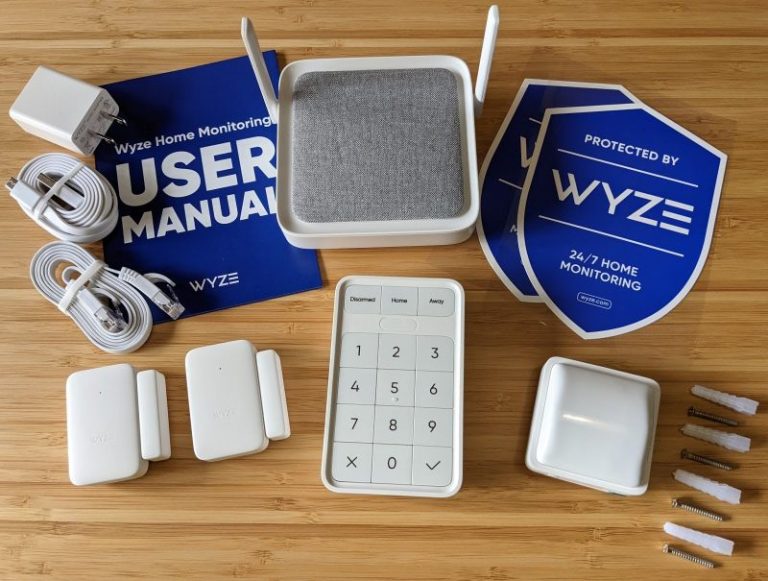
What's in the Core Starter Kit box

  • Wyze Sense v2 Hub
  • Wyze Sense Keypad
  • Wyze Sense v2 Motion Sensor
  • Wyze Sense v2 Entry Sensor (2)
  • Window decals (2)
  • Mounting screws
  • Power adapter
  • Ethernet cable
  • Quick start guide
Wyze Home Monitoring items that come in the box

Wyze security cameras

Wyze is the best value in security cameras thanks to its cameras that match the features of more expensive (or even average-priced) brands like Arlo, Ring, and Google Nest. Chief among these is the Wyze Cam, which offers excellent night vision and a design that works inside and outside your home.

Indeed, Wyze cameras aren't nearly as advanced—some of them (not all!) lack 5GHz Wi-Fi support, don't work with large microSD cards, and don't support as many smart home platforms. But what Wyze lacks in advanced features, it makes up in reliability at a fantastic price.

Camera
List price*
Field of view
Video storage
Weatherproofing
Power source
Learn more
120ºCloud,
microSD card
Icon Yes  LightIP65
USB adapter
130ºCloud,
microSD card
Icon Yes  LightIP65
USB adapter
360ºCloud,
microSD card
Icon Yes  LightIP65
Battery,
USB adapter
110ºCloud,
microSD card
Icon Yes  LightIP65
Battery,
USB adapter
120º (lens)
360º (pan)
Cloud,
microSD card
Icon No  LightIndoor only
USB adapter
120ºCloud only
Icon Yes  LightIP65
Doorbell wiring
150ºCloud only
Icon Yes  LightIP65
Doorbell wiring/wireless
135º x 103ºCloud only
Icon Yes  LightIP65
Doorbell wiring

*Amazon.com price as of post date. Offers and availability may vary by location and are subject to change. Read full disclaimer.

Thumbs Down
Camera limit

While Wyze's monitoring plans say they work with an "unlimited" number of cameras, we did a little digging and found that you can only have five cameras with a Wyze home security system. Bummer. That means if you have a doorbell camera, three outdoor cameras and one indoor camera, you're at your limit. 

Wyze has a pretty wide range of cameras, so the right pick really depends on where you're putting it and what you need it to do. And of course, what you're willing to pay.

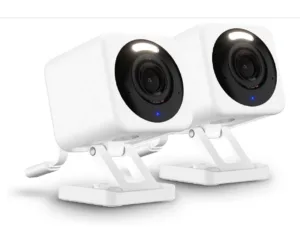
Let's start with the standard cams. The Wyze Cam v4 runs $69.98 for a two-pack, giving you a 120-degree field of view, cloud and microSD storage, and IP65 weatherproofing, which means it's rated to handle dust and water — basically built for outdoor use. It runs on a USB adapter. The Wyze Cam v3 is the budget version at $35.98, with a slightly wider 130-degree view and the same storage and weatherproofing setup.

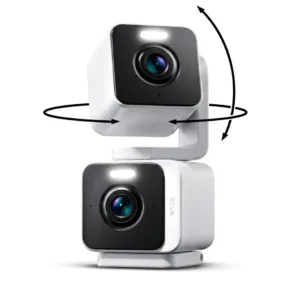
If you want something that can actually move, the Wyze Duo Cam Pan gets you a full 360-degree field of view for $69.98 using two cameras stacked on top of each other. Plus it's got the same cloud and microSD storage and IP65 rating as the others. It's also got the option to run on battery or USB power, which is nice if you don't have an outlet nearby.

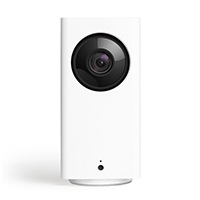
The Wyze Cam Pan v2 is a cheaper alternative at $48.09, offering 120 degrees through the lens with a 360-degree pan, but it's indoor-only — no weatherproofing here — and it sticks to USB power.

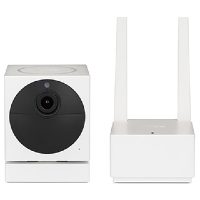
For strictly outdoor use, there's the Wyze Cam Outdoor at $89.98. It's got a 110-degree field of view, cloud and microSD storage, IP65 weatherproofing, and runs on either battery or USB adapter, so you're not tied to an outlet if you don't want to be.

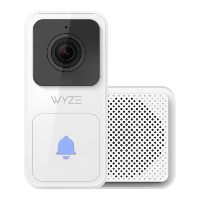
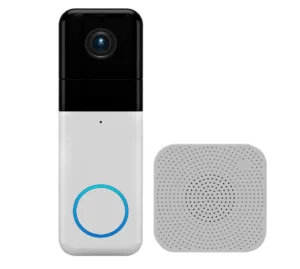
Now, onto the doorbell cameras. The Wyze Video Doorbell is the cheapest of the bunch at $19.95, with a 120-degree view, cloud-only storage — no microSD card slot on this one — and IP65 weatherproofing. It connects through your existing doorbell wiring.

Step up to the Wyze Wireless Video Doorbell Pro at $103.98, and you get a wider 150-degree view along with the flexibility of wiring it in or going fully wireless. It's still cloud-only for storage, but the weatherproofing and general build quality bump up a notch.

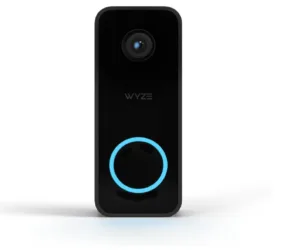
Then there's the Wyze Wired Doorbell Camera v2 at $59.98, which offers a 135 x 103-degree view, cloud-only storage, IP65 weatherproofing, and connects through doorbell wiring.

That's a lot of options, huh? Here's how I'd break it down. If you want flexible outdoor coverage, the Cam v4 or the Duo Cam Pan are worth the extra cash for weatherproofing and better fields of view. If you're on a budget and don't need anything fancy, the Cam v3 gets the basics done for half the price.

And if you're shopping doorbell cameras, the price gap between the base Video Doorbell and the Wireless Pro is pretty big, so it comes down to whether you want that wider field of view and wireless flexibility badly enough to pay for it.

Thumbs Down
Wyze privacy breach

Wyze experienced another breach on February 16, 2024. As many as 13,000 users were affected. Once again, users received access to thumbnails, events, and even videos that weren't from their camera's feed.

Wyze responded quickly, apologized, and resolved the issue, but that isn't enough for some users who no longer trust their Wyze cameras to keep images of their homes private. If you have a Wyze camera, check out our recommendations of what to do in light of these breaches.

Wyze smart home devices

Wyze makes many smart home devices that work directly with Wyze Home Monitoring. You can set up routines to control them together. Here are a few of Wyze's smart home products.


*Amazon.com price as of post date. Offers and availability may vary by location and are subject to change. Read full disclaimer.

Wyze setup and installation

Setup

Wyze home security installation takes around 30 minutes, including adding it to the app. To set up your Wyze security system, you first need to activate it using a code that Wyze delivers via email. Then, install the hub and connect it to the internet using the Wyze app. After that, the app walks you through the rest of the process. Here's a quick overview of the steps from the Wyze support website:

  • Pair the keypad and sensors.
  • Add contact information so Noonlight monitoring can reach you during an alarm event.
  • Set up alarm triggers so the system knows which sensors to use in the Home and Away modes.
  • Set up a PIN code for disarming or canceling the alarm.
  • Set up an entry/exit delay to reduce false alarms.
  • Add Wyze security cameras to your system.
  • Set up a safe word for canceling an alarm after Noonlight calls you.
  • Set notification preferences.
  • Enter Test Mode before activating the live monitoring service.
Notepad
Set up sensors first

It's easier to set up all of the sensors before you install them in their final places. This saves time by not having you run back and forth. It also allows you to test if a sensor works in the intended location before removing the adhesive backing.

Installation

Installing the starter kit was a breeze. It took only about 15 minutes to set up all three sensors, the hub, and the keypad—nice and simple. The hub connects to your home network using Wi-Fi or an Ethernet cable. (Wyze recommends using Ethernet if possible—wired connections are generally more reliable.)

The keypad and sensors all come with batteries installed, so you need only to remove a plastic tab to turn them on. They also have a peel-off adhesive backing that makes them easy to attach to any surface. The motion and entry sensors run on replaceable AAA batteries while the keypad trades up for AA batteries.

We like that the batteries are readily available in stores, unlike the specialty batteries that some other brands use. Both the motion and entry sensors are a bit larger than Wyze's first-generation versions but benefit from larger batteries that last longer (up to 18 months) than the older sensors' coin batteries (up to 12 months).

Because Wyze equipment installs without screws or hardwiring, it's one of the best security systems for renters.

Checklist
Wyze mobile app

In addition to helping you set up the system, the Wyze app also gives you access to other Wyze devices and settings. As it relates to Wyze Home Monitoring, you'll mostly use it for checking on notifications, arming and disarming your system, and watching videos from your security cameras. Overall, we found it pleasant and easy to use during our testing.

Wyze smart home features and compatibility

The Wyze DIY security system offers third-party compatibility with other smart home platforms like Amazon AlexaGoogle Assistant, and IFTTT. This means you can control the system with voice commands or other apps.

Wyze customer service and support

Wyze Home Monitoring has extensive self-serve customer support resources on the main Wyze support website. We found it easy to look up setup instructions, FAQ articles, and troubleshooting guides whenever we had a question (making our job much simpler). You can also contact Wyze directly through the helpful live chat tool, though we didn't see a phone number if that's something you prefer.

Wyze contract and warranty

There's no contract with either Wyze monitoring plan—you can cancel anytime without penalties. The only difference is for annual subscribers, where you must return your starter kit if canceling within 30 days of shipping. This cancellation policy is similar to that of Ring Alarm, while SimipliSafe's trial period is 60 days.

Among DIY security companies, Wyze has one of the shortest warranties—only a single year. The company won't replace defective equipment after that. Although one year is shorter than the average DIY security system warranty, Wyze's equipment is much more affordable to replace compared to the sensors, cameras, and hubs of other brands. This helps balance out the short warranty.

Light Bulb
Wyze user community

One of our favorite things about Wyze support is its vast user community spread across various platforms like the Wyze forum, Facebook, Reddit, Twitter, and YouTube. Social media accounts like these are one of the best ways to learn about common problems, cool new features, and compare experiences with other customers—even if they're not always as direct as a customer support page.

Final word

Wyze Home Monitoring is an easy, inexpensive option for keeping tabs on your home while you're away. It won't give you the cellular backup or equipment selection of a pricier security system, but competitors can't match its rock-bottom monitoring and equipment prices. Plus, it's an excellent companion to Wyze's security cameras. In short, it's discreet and easy to use, it functions well, and the price is hard to beat.

Wyze Home Monitoring FAQ

You can use the Wyze app to request a downloadable Noonlight Monitoring Certificate to share with your insurance company. From there, the availability and amount of a discount depend on your insurance company.

While you can still use older Wyze Sense v1 equipment with the Wyze app, it's not compatible with the Wyze Home Monitoring systems that use Wyze Sense v2 devices.

Switching from a monthly Wyze plan to an annual one results in Wyze refunding the cost of your Core Starter Kit. Both the monthly and yearly plans cost $59.88 per year, so it's mostly a matter of saving on the equipment and if you want to spread out the costs over time.

Wyze doesn't yet offer devices for detecting smoke or carbon monoxide. Still, Wyze security cameras have sound detection features to alert you with a push notification if the camera detects a smoke alarm in your home.

Yes, but you might need to replace the adhesive. We recommend getting some Command strips if you need to reattach sensors to a new surface.

According to Wyze, it achieves low costs by partnering with efficient manufacturers, selling many products directly to consumers on its website, and not aiming for a high profit margin.

Most Wyze security cameras require Wi-Fi to set up but can record without Wi-Fi after that as long as you insert a microSD card. The only Wyze camera model without a microSD slot is the Wyze Video Doorbell.

How we reviewed Wyze Home Monitoring

We tested the Wyze Home Monitoring Core Starter Kit in a small apartment for a few days. Since it was new to us, we kept to Wyze's recommendations and used the system in Test Mode, which disables the connection to the monitoring center. (No need to summon the police accidentally.) Here are some things we looked at during our tests:

  • Setup and installation
  • Mobile app controls
  • System arming modes
  • Sensor responsiveness
  • Noonlight terms and conditions
  • Wyze security camera integration

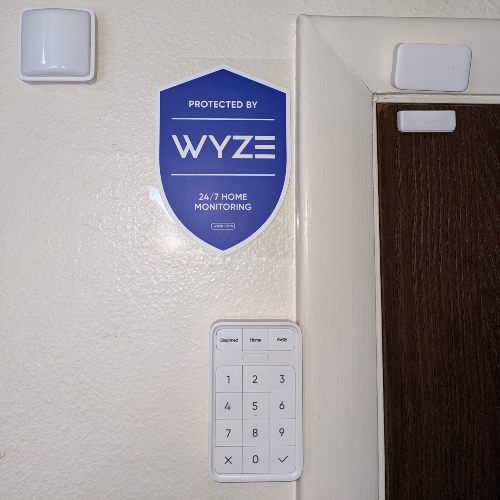
Our simple (yet effective) setup for testing Wyze Home Monitoring in a small apartment

To find out more about how we test and review products, read our full methodology.

Related articles on SafeWise


Disclaimers

Product prices and availability are accurate as of the date/time indicated and are subject to change. Any price and availability information displayed on Amazon at the time of purchase will apply to the purchase of this product. Safewise.com utilizes paid Amazon links.

Certain content that appears on this site comes from Amazon. This content is provided “as is” and is subject to change or removal at any time.

Alina Bradford
Written by
Alina is a safety and security expert with over 25 years of experience. She has contributed her insights to CNET, CBS, Digital Trends, MTV, Top Ten Reviews, and many others. After testing thousands of devices, apps, services, and more, her goal is to make safety and security gadgets less mystifying one article at a time. In the early 2000s, Alina worked as a volunteer firefighter, earning her first responder certification and paving the way to her current career. Plus, she has tested hundreds of pieces of security and safety equipment over the years. Places published: CBS, MTV, CVS, Rachael Ray, eBay, Reader’s Digest, ConsumerAffairs, and more. Certifications: Fire Service Training, Oklahoma State University. Awards: Received the Experience Leader certificate from Authority, putting her “in the top 25% among the thousands of professional content creators analyzed by Authory for the Fall 2023 audit.” You can view more of Alina's work at alinabradford.com.

Recent Articles

Technician installing a smoke alarm
Best Smoke Detectors of 2026
We reviewed the top fire and smoke alarms for your home in 2026. Protect your...
woman checking on home security system via app on smartphone
The Best Alexa-Compatible Home Security Systems
Best for built-in integration ADT Voice control of ADT system Works with Alexa Guard View...
Vivint App: A Complete Guide to Features and Use
Tour the Vivint app and discover its features, navigation, and customization capabilities. Learn how to...
dangerous apps for kids
Dangerous Apps for Kids: What Parents Need to Know in 2026
Dangerous apps for kids include ones you’ve heard of (TikTok, Instagram) and some new arrivals....