

The Best Alexa-Compatible Home Security Systems

Best for built-in integration
Ring
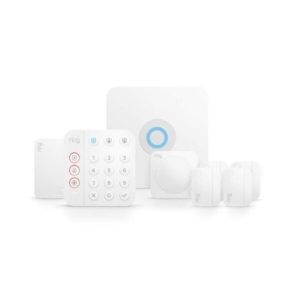
Ring Alarm
  • pro
    Use Alexa Guard Integration
  • pro
    Ask Alexa to track battery life
Best for pro monitoring
ADT Shield
ADT
  • pro
    Voice control of ADT system
  • pro
    Works with Alexa Guard
Best for
Abode Home Security Logo
Abode
Why you can trust SafeWise
products considered
250+
research hours in 25+ in-home tests
10k+
years of combined experience
176+
homes and people protected
10M+

For over 13 years, SafeWise experts have conducted independent research and testing to write unbiased, human reviews (not robots). Learn more.

Alina Bradford
Jul 03, 2026
Icon Time To Read7 min read
Icon CheckReviewed ByRebecca Edwards

With 30+ years as a journalist and blogger, Rebecca’s expert safety advice is sought by NPR, Forbes, The Today Show, and many others in media and research.

SimpliSafe or Vivint are both compatible and work well with Alexa, with all the newfangled bells and whistles needed to make your home smart.

ADT has been the first name in home security for nigh on two centuries—but that esteemed reputation has collected a little dust over the years. We’ve enjoyed all the updates and changes ADT has rolled out, and its strong Amazon Alexa integration is one of our favorites.

While most of the best home security systems let Alexa arm and disarm your system, ADT gives you true voice control. You can turn smart lights on, adjust the temperature, and ask if you left the garage door open (hint—if you did, Alexa will close it for you).


Compare the best Alexa home security systems

Company
Best for
Lowest monthly price*
Installation
Contract required
Arm with Alexa
Smart home control with Alexa
Call for help with Alexa
Learn More
ADT ShieldBest for monitoring

Pro

Icon No  LightYes
Icon Yes  LightYes
Icon Yes  LightWith higher plan
Icon Yes  LightWith Alexa Guard
RingBest for integration DIY
Icon Yes  LightNo
Icon Yes  LightYes
Icon Yes  LightRequires Ring Bridge
Icon Yes  LightWith Alexa Guard Plus

*Amazon.com price as of post date. Offers and availability may vary by location and are subject to change. Read full disclaimer.
Full ADT disclaimer

Our approach

To figure out which security systems work best with Amazon Alexa, we started with the systems we already know do a good job at keeping your home and family safe. We considered our usual criteria, including price, tech and equipment, customer satisfaction, and overall value.

From there, we looked at how easy it was to add voice control with Alexa and how much you could do with it.

We prioritized systems that offer great pro monitoring and those that let you do more with Alexa than simply arm and disarm your security system. Top consideration was given to these primary factors:

  • Built-in Alexa integration
  • Alexa Guard integration
  • Smart home controls and smart devices
  • Emergency help integration

The best security systems that work with Alexa reviews

Ring Alarm: Best for built-in integration

Best for integration

Because Ring and Alexa are owned by the same company (Amazon), Ring Alarm has a lot of Alexa-compatible functions. But it didn’t take the top spot on our list, because its home security offerings aren’t as robust as other DIY security options like Frontpoint.

The Ring ecosystem

That said, if you already have a Ring video doorbell or other Ring smart home device, the Ring Alarm security system is an affordable choice that gives you the option of 24/7 professional monitoring.

And if you rent or live in a smaller home, Ring’s slimmer offerings might be a better fit than a larger security system.

But beware; the more extras you want—like security cameras or motion-detection flood
lights—the bigger your up-front price tag will be. You also have to buy special equipment (a Ring Bridge for Ring devices or a Ring Transformer for third-party devices) to make those smart gadgets work with voice control through Alexa.

Ring and Alexa

When all is said and done, it’s a little confusing to figure out how to best maximize Alexa integration with the Ring Alarm system.

I usually love the option to shop by myself online without having to talk to someone. But to get the best Ring Alarm and Amazon Alexa setup, it took a lot of digging and reading to make sure I had all the components I’d need—and knowing this stuff is quite literally my job!

We recommend reaching out to Ring for help to make sure you get everything you need to have all the controls and convenience you want. Their online chat support is your best bet, especially with COVID-19 measures in place.

Learn more in our full review of Ring Alarm.

What you can do with Ring Alarm and Alexa

Here’s a sample of all the things you can control with your voice when you add the Ring skill to your Amazon Alexa app:

  • Control Ring video doorbells and set up doorbell announcement notifications.
  • Control Ring smart lighting devices.
  • Control and access footage from Ring security cameras.
  • Control Ring smart locks.
  • Monitor battery life in all of your devices.
  • Create smart home routines.
  • Use Alexa Guard to listen for breaking glass and smoke and CO alarm alerts.
  • Use Alexa Guard Plus (free with Ring monitoring) to call for help in an emergency.
pro
Pros
pro Built-in Alexa integration
pro Cheap monthly monitoring fees
pro Full Ring ecosystem compatibility
pro No contract required
con
Cons
con Extra equipment required
con Up-front price can get expensive

ADT: Best for pro monitoring

Best for pro monitoring

ADT has always been good at keeping watch over your home, but its tech evolution has often lagged behind other home security companies. 2020 heralded a new era for the security stalwart, and we’re glad to see it.

We put ADT at the top of this list because you get high-end home security protection—including six redundant monitoring centers. And that’s only made better when you add the convenience of voice control with Amazon Alexa.

ADT and Alexa 

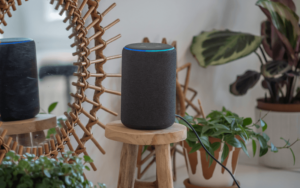
When you add the Alexa Smart Home skill to your ADT home security setup, you turn Alexa into your household safety monitor. You can use voice control to do things that would normally require you to open the ADT+ app on your phone.

That’s convenient if you’re elbows deep in dinner, but it’s extra helpful for people with dexterity issues or other challenges that make getting into your phone an arduous task.

Alexa Guard integration

Plus, you can activate Alexa Guard to listen for signs of danger when you’re not at home. If something suspicious is detected (the fire alarm or breaking glass) you can get an instant alert on your phone or have Alexa send an audio clip directly to an ADT monitoring center for immediate assistance.

Light Bulb
Insider info

Alexa Guard lives in your Alexa app. All you have to do is open your Alexa app, go to settings, and activate it. No extra cost, no monthly fees, and no hassle.

These extra “ears” let you run errands or visit the grandparents in peace—knowing that ADT (and Alexa) are keeping watch on everything while you’re away.

The biggest disappointment is that you need to spend more to get these benefits. The lowest-level monthly plan that comes with Alexa compatibility runs about $45 per month, and you can’t get smart home controls until you jump up to the $63 monthly plan.

Get all the details in our full ADT review.

What you can do with ADT and Alexa 

On top of arming and disarming with the ADT skill, you can use Alexa to control other smart home devices and keep you updated on system activity. You can try these tasks:

  • Check in on the status of your system (is it armed?).
  • Turn lights on and off, and dim or change colors on smart light bulbs with home automation options.
  • Check your Nest Doorbell when the motion detector at your door goes off.
  • Lock and unlock smart door locks.
  • Control the temperature in different rooms to make sure everyone is comfy.
  • Use Alexa Guard to monitor CO and smoke alarms, listen for suspicious sounds like glass breaking, and automatically send audio clips to ADT’s monitoring centers.
pro
Pros
pro Echo device included in some ADT packages
pro Alexa Guard integration
pro 147 years of experience
pro 6 monitoring centers
con
Cons
con Alexa integration requires more expensive plan
con Smart home controls cost even more
con Mandatory contract

ADT: Best for pro monitoring

Best for pro monitoring

Abode gives you a lot of control with Alexa. You can view live video on screen-enabled Alexa devices, set routines to have Alexa announce when specific doors and windows open or close, arm and disarm your Abode system, control lights and locks, and more.

ADT and Alexa 

When you add the Alexa Smart Home skill to your ADT home security setup, you turn Alexa into your household safety monitor. You can use voice control to do things that would normally require you to open the ADT+ app on your phone.

That’s convenient if you’re elbows deep in dinner, but it’s extra helpful for people with dexterity issues or other challenges that make getting into your phone an arduous task.

Alexa Guard integration

Plus, you can activate Alexa Guard to listen for signs of danger when you’re not at home. If something suspicious is detected (the fire alarm or breaking glass) you can get an instant alert on your phone or have Alexa send an audio clip directly to an ADT monitoring center for immediate assistance.

Light Bulb
Insider info

Alexa Guard lives in your Alexa app. All you have to do is open your Alexa app, go to settings, and activate it. No extra cost, no monthly fees, and no hassle.

These extra “ears” let you run errands or visit the grandparents in peace—knowing that ADT (and Alexa) are keeping watch on everything while you’re away.

The biggest disappointment is that you need to spend more to get these benefits. The lowest-level monthly plan that comes with Alexa compatibility runs about $45 per month, and you can’t get smart home controls until you jump up to the $63 monthly plan.

Get all the details in our full ADT review.

What you can do with ADT and Alexa 

On top of arming and disarming with the ADT skill, you can use Alexa to control other smart home devices and keep you updated on system activity. You can try these tasks:

  • Check in on the status of your system (is it armed?).
  • Turn lights on and off, and dim or change colors on smart light bulbs with home automation options.
  • Check your Nest Doorbell when the motion detector at your door goes off.
  • Lock and unlock smart door locks.
  • Control the temperature in different rooms to make sure everyone is comfy.
  • Use Alexa Guard to monitor CO and smoke alarms, listen for suspicious sounds like glass breaking, and automatically send audio clips to ADT’s monitoring centers.
pro
Pros
pro Echo device included in some ADT packages
pro Alexa Guard integration
pro 147 years of experience
pro 6 monitoring centers
con
Cons
con Alexa integration requires more expensive plan
con Smart home controls cost even more
con Mandatory contract

Final word

Voice control is fun and convenient, but when it comes to your security system, voice control needs to add extra safety. Here’s a quick recap of which home security systems’ Alexa integrations fit the bill.

Ring Alarm comes with built-in Amazon Alexa compatibility and also includes Alexa Guard, but Ring’s security system equipment and features aren’t as robust as ADT’s.

ADT offers the most benefits when you add voice control with Amazon Alexa. And we like that the company is so committed to these features that it includes Amazon Echo devices with some of its packages. We also like the extra reassurance of Alexa Guard—that gives you back-up if something happens when you’re asleep or away from home.

If you’re still not decided, check out our favorite smart home security systems.

FAQ

To connect Alexa to your security system, all you need to do is add the skill for your home security company to your Alexa app.

You can find out if your security system works with Alexa by looking for an Alexa skill that matches your security system. Most of the security systems we looked at have Alexa skills that use the brand name. For example, the Alexa skill for ADT is called “ADT.”

For most security systems you can search in Alexa skills or narrow it down by looking in Alexa skills under “Smart Home.” Once you add the skill for your system, you’ll be able to control or check in on your security setup by talking to Alexa through your Echo device.

Yes. That is the most common skill available when you add Amazon Alexa voice control to your home security system. But most systems don’t let you disarm your system or unlock doors with Alexa.

Alexa Guard is a free security feature that lets your Amazon Echo device listen for suspicious sounds like glass breaking or your smoke alarm going off. When you activate Guard in your Alexa app, Alexa will notify you if the device picks up something unusual. You don’t need to have a security system to use Alexa Guard, but not all security systems work with Alexa Guard.

Alexa Guard Plus is a paid plan (about $5 a month) that adds more sound detection, sound deterrents, and an emergency helpline for calling for help. We like that it detects more sounds, like footsteps, doors closing, and people talking. It also plays sounds (like a dog barking or a siren) on your Alexa speakers to deter intruders.

Sort of. When you use Alexa Guard, you get notifications of noises happening at your house. If your smoke or CO alarm is triggered, you can call emergency services for help. If you hear glass breaking, you can alert the authorities.

But Alexa isn’t a substitute for professional monitoring from your home security company. It gives you an extra layer to add to self-monitoring if that’s your preference—but you won’t have professionals monitoring your house 24/7. And you won’t have a direct link to emergency services if there is a fire or break-in.

Yes. Most security systems require you to ask Alexa to ask the system to do an action. For example, you need to say, “Alexa, tell Scout to panic,” instead of just saying, “Alexa, panic mode.”

For some actions, like smart lighting control, you may be able to simply tell Alexa to dim the lights or turn them off. Be sure to pay attention to all directions when you install the Alexa skill for your security system. That’s when you’ll find out what type of voice commands you need to use with your security system.

Related articles on SafeWise


Disclaimer

*Amazon.com list price as of post date. Product prices and availability are accurate as of the date/time indicated and are subject to change. Any price and availability information displayed on Amazon at the time of purchase will apply to the purchase of this product. Safewise.com utilizes paid Amazon links.

Certain content that appears on this site comes from Amazon. This content is provided “as is” and is subject to change or removal at any time.

Alina Bradford
Written by
Alina is a safety and security expert with over 25 years of experience. She has contributed her insights to CNET, CBS, Digital Trends, MTV, Top Ten Reviews, and many others. After testing thousands of devices, apps, services, and more, her goal is to make safety and security gadgets less mystifying one article at a time. In the early 2000s, Alina worked as a volunteer firefighter, earning her first responder certification and paving the way to her current career. Plus, she has tested hundreds of pieces of security and safety equipment over the years. Places published: CBS, MTV, CVS, Rachael Ray, eBay, Reader’s Digest, ConsumerAffairs, and more. Certifications: Fire Service Training, Oklahoma State University. Awards: Received the Experience Leader certificate from Authority, putting her “in the top 25% among the thousands of professional content creators analyzed by Authory for the Fall 2023 audit.” You can view more of Alina's work at alinabradford.com.

Recent Articles

Technician installing a smoke alarm
Best Smoke Detectors of 2026
We reviewed the top fire and smoke alarms for your home in 2026. Protect your...
woman checking on home security system via app on smartphone
The Best Alexa-Compatible Home Security Systems
Best for built-in integration ADT Voice control of ADT system Works with Alexa Guard View...
Vivint App: A Complete Guide to Features and Use
Tour the Vivint app and discover its features, navigation, and customization capabilities. Learn how to...
dangerous apps for kids
Dangerous Apps for Kids: What Parents Need to Know in 2026
Dangerous apps for kids include ones you’ve heard of (TikTok, Instagram) and some new arrivals....