Emily and Cathy are some of the internet's most knowledgeable voices in senior safety tech. Each holds a certificate in gerontology, and they have 9 years of combined experience testing, researching, and reviewing medical alert systems. Both have covered aging and wellness in major publications.
Key takeaways
The Lifeline Home Cellular performed best overall in our tests.
The On the Go Mini Pendant failed to detect any test falls.
All mobile systems dropped multiple calls and had issues connecting to the monitoring center outside the home.
The Smart Watch is the most reliable Lifeline mobile system, but it wasn't perfect.
Lifeline sells medical alert systems designed to call for help at home or on the go. While Lifeline has been around for 50+ years and is highly rated with more than 6,000 customer reviews, we were disappointed with our hands-on testing experience.
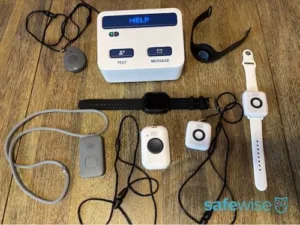
We tested six total devices, and while some had their moments, the brand’s overall performance was unreliable due to its poor cellular connection, inaccurate GPS tracking, and low-quality audio.
While this may not be everyone's experience with Lifeline, our review is based on our hands-on testing results. Check out the testing details below to see how we came to this conclusion, and and learn which devices we’d recommend instead.
Lifeline medical alert systems connect you to a 24/7 monitoring center any time you press the help button or trigger the optional fall detection sensor. The monitoring agents talk to you through a speaker on the base station (at-home system) or wearable device (mobile system). They find out what kind of help you need and call the best people to respond. For example, if you've fallen but you're okay, Lifeline might call your neighbor to give you a hand. But if you're hurt, they'll call an ambulance.
With Lifeline, you can choose between a traditional at-home system or three on-the-go systems. Here's a quick look at the company's main features and services:
Note that some of these features may cost an additional monthly fee, and some may only be available in specific products. We'll share more details below to help you choose the best one for you.
Is Lifeline reliable? Can I trust it to keep me safe?
After extensive hands-on testing and disappointing results, we don’t think Lifeline is a reliable medical alert system. Every single mobile system dropped multiple calls to the monitoring center or simply didn’t reach an agent at all. When we did reach an agent, the audio was often muffled or cut off, making it very difficult to communicate. At one point, an agent even hung up on us!
We also had very mixed GPS location results. A few mobile systems detected one or two accurate locations, but no system correctly tracked all three of our test locations.
Our Lifeline devices couldn’t consistently perform the most basic function of a medical alert system. While some devices had impressive fall detection — the at-home fall detection pendant and On the Go Standard detected all six test falls — we can’t recommend this brand in good faith based on our overall testing experience.
Summary of our Lifeline performance tests
The below table highlights Lifeline’s overall performance during testing. We’ll break down each testing category and our results in more detail in the following sections.
Fall detection response
Mixed results. The at-home pendant and On the Go Standard detected 6/6 falls, while the On the Go Pendant detected 0/6 falls. All other devices detected more than half test falls.
Fall detection false alarms
Most devices accidentally triggered fall detection at least once during the normal course of the day.
GPS accuracy
Poor performance for all devices. Most only detected 1 out of 3 locations, and none detected 3/3 correct locations.
Monitoring center response
Average response time was 73 seconds, slightly over 1 minute.
Audio quality
Poor overall. Audio was garbled, low, and cut off for most calls.
Battery life
All devices lasted all day, if not longer.
Ease of use
Large central buttons were easy to press for the most part. Only one lanyard was magnetic; the others were awkward plastic clasps.
App interface
Unable to test the app.
Fall detection: Fairly accurate with one disappointing outlier
We conducted six total test falls for all Lifeline medical alert systems. The Home Cellular fall detection pendant and the original On the Go system successfully detected all six falls. We were impressed with how quickly all devices registered falls — the verbal confirmation was pretty much immediate. The On the Go Mini Pendant detected no falls. To make sure this wasn’t a fluke, we confirmed twice with an agent that fall detection was activated. It was!
The other systems detected more than half of our test falls, which is impressive. We also liked how simple it was to cancel false alarms by holding down the help button. You can also cancel calls made with the at-home system, which isn’t always the case with other brands. One thing to note about canceling Home Cellular calls: you must cancel them by pressing the base unit help button, not the pendant itself. This may be difficult if your pendant accidentally goes off in a larger home, when you’re outside, or if you’re in the shower.
Fall detection is a standard medical alert system feature designed to contact the monitoring center after a fall, even if you can’t press the help button. Fall detection devices contain a sensor that measures speed, distance, and direction. When the sensor is activated, it triggers the device to call the monitoring center.
Remember, even the best fall detection devices can't detect 100% of falls. Like other brands, Lifeline urges users to press the help button in an emergency whenever possible. Fall detection is still a helpful safety feature, especially for those with a higher risk of falls. Fall detection isn't a preventative measure and should never take the place of a caregiver.
We tested Lifeline’s fall detection by conducting two sets of simulated falls for each device:
Hard, fast falls: We held the device at our shoulder and dropped it onto a carpeted floor. This is meant to mimic sudden falls with a hard, fast impact.
Slow, soft falls: We tossed the device onto the carpet in a slower bowling motion. This mimics more gradual falls where the person may catch themselves as they fall.
We realize our tests don't perfectly simulate an actual fall, but this is the the safest way for us to mimic two different types of falls.
Fall detection is available for all Lifeline medical alert systems for an extra $15 per month.
GPS location: Unreliable and inaccurate
Share:
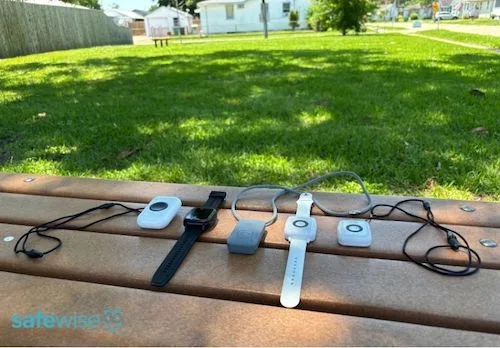
We tested GPS accuracy in three separate locations. Image: Emily Breaux, SafeWise
GPS location accuracy is a critical feature for any mobile medical alert system. If you have an emergency outside your home and contact the monitoring center, the agent views your device’s current location to dispatch EMS and/or caregivers to you. As part of our GPS testing protocol, we conduct test calls in three separate locations: two different neighborhood spots and a parking garage.
All five mobile systems accurately picked up my first neighborhood location, but only the Smart Watch correctly detected the second location. All other devices either had an inaccurate location, didn’t complete the call, the call suddenly dropped, or even connected to a random business! We’re not kidding, the voice on the other line mentioned they were with a law office during one of our outdoors calls using the On the Go Standard.
Our third location for GPS tracking tests is a parking garage. The results were absolutely abysmal. The On the Go Mini Wristband had no cellular connectivity and couldn’t even place a call to the monitoring center. The On the Go Standard was the only device to reach an agent, but the location the agent pulled up was a business completely across the street. Other devices either dropped our call halfway through or the speaker was so garbled we couldn’t get any information from the monitoring center agent.
We were texting and making calls from our personal cellphone after testing all mobile devices, so there was cell service in the parking garage, just not for most of our Lifeline systems.
GPS location tracking is a crucial feature for any mobile medical alert system. It can be the difference between getting help or not during an emergency, so these results are very disappointing.
Monitoring center response: 73-second average
The monitoring center’s ability to respond in an efficient, professional manner is the most important quality of any medical alert system. Lifeline’s average response time was 73 seconds, or slightly over one minute. We consider this a good response time overall.
All Lifeline medical alert systems allow you to cancel calls before reaching the monitoring center. When you place an emergency call, all devices verbally confirm you’re calling the monitoring center and give you a chance to cancel the call.
After that, there’s an initial ringing and then an automated voice asks if you need help. If you say yes, your device calls the monitoring center, but there’s no constant ringing or beeping to indicate you’re still calling the monitoring center. For calls that took nearly two minutes, we weren’t sure if we were still connected. And in some cases, our suspicions were accurate. We had multiple calls drop without any indication, and during other calls, we finally heard a short ringing before an agent answered. In an emergency, this is unacceptable. The silence is unsettling, and users may be worried that their device isn’t actually contacting anyone.
We were also surprised by our interactions with certain monitoring center agents. Some seemed agitated by my questions, while others were antagonistic that we were testing devices. We would hope all users, whether testing their device or not, would still be met with patience and understanding. Some users may accidentally call the monitoring center multiple times or be confused with setup or have various questions about their devices, and certain agents did not seem like they would handle those scenarios well.
Of course, this doesn’t go for all agents we spoke with. Many were professional and helpful, and every customer service representative we contacted was knowledgeable and friendly.
Audio quality: Mixed results
Share:
We observed audio quality whenever calling the monitoring center. Image: Emily Breaux, SafeWise
We noted each device's speaker quality when calling the monitoring center and speaking with an agent through the two-way speaker. The results were mixed, with more loses than wins.
When testing the On the Go Micron, it was difficult to hear the agent at times, but other times the audio was loud and clear. We could speak with the agent even when the device was on the ground after a test fall.
On the Go Mini Wristband and Pendant both had poor audio. It was difficult to hear or communicate with the agent during most calls. At one point, an agent hung up on us because our conversation was so unintelligible.
The On the Go's audio was ok, but most of the time we had to hold the device closer to speak to and hear the agent.
The Home Cellular speaker was loud when announcing automated prompts, such as calling the monitoring center or no power detected, but audio would often cut out when we were speaking with an agent.
Overall, Lifeline's speaker quality was poor, which could make an emergency even more stressful when trying to communicate with an agent.
Battery life: Lasts all day and more
Share:
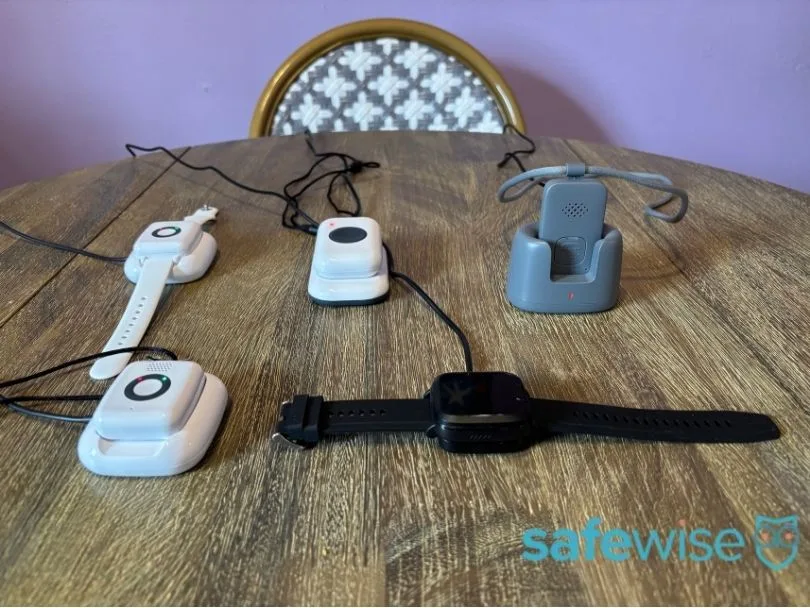
Lifeline mobile systems take 1–2 hours to fully charge. Image: Emily Breaux, SafeWise
In general, at-home systems have a backup battery that kicks in when the base unit is disconnected from power. Mobile systems have a rechargeable battery that lasts one or multiple days depending on the device, usage, and whether it has fall detection or not.
The battery life for all Lifeline devices was impressive. The mobile systems lasted multiple days without a charge, and the base unit still had power more than 30 hours after it was unplugged.
Even though most devices have a multi-day battery, Lifeline urges users to charge their device daily.
Caregiver features: Free app with location tracking
Lifeline's main caregiver features are found in its app: MyLifeline. Caregivers can receive emergency alerts, check battery status, check the location of mobile devices, and share notes and photos. We like that the app is free, since some companies charge extra for an app or don't offer one at all.
Unfortunately, we weren't able to test Lifeline’s caregiver app since we had a demo account.
How much does Lifeline cost?
Lifeline costs vary based on which device you choose and how often you want to be billed, but they're typically about $35 to $50 per month. AARP members get 15% off.
We'll share specific details in a moment, but here's a quick overview for now:
One-time costs: $99.95 to $159.95 (setup and/or equipment fee)
Monitoring fees paid monthly: $39.95/mo. to $49.95/mo.
Monitoring fees paid every six months: $37.95/mo. to $49.95/mo.
Monitoring fees paid annually: $34.95/mo. to $44.95/mo.
Shipping: $0 to $29.95
All Lifeline customers receive a free price lock guarantee for the first 12 months of service. You can buy a lifetime price lock guarantee to protect yourself from rate increases, but you'll need to call Lifeline to get it. It's $5/mo. to lock-in the price for one year, or $10/mo. for a lifetime price lock. You can purchase the price lock guarantee at any time, even if you've already bought a Lifeline system.
In the tables below, you can compare costs across devices and view optional add-on fees. Click each header to expand the table.
A Lifeline professional delivers and sets up your device (not available in all zip codes)
Info current as of post date. Offers and availability may vary by location and are subject to change.
To our knowledge, Lifeline is the only medical alert company that offers professional installation. This service may be useful if you're getting the in-home system and aren't comfortable with technology or don't have anyone to help you set it up.
The Lifeline representative can make sure your base station is set up in the best location for easy communication and cellular reception. They can also make sure there are no "dead spots" in your home where the button doesn't activate the base station.
Because Lifeline's mobile devices work as soon as you take them out of the box, there's no need to buy professional installation for them. Simply charge them and press the button to test the connection to the monitoring service. (Tell the agent you're just testing the device when they answer.)
Other Lifeline fees
You may owe some money when cancelling Lifeline. Here's what you should know:
If you cancel after the first 15 days but before 90 days, you'll owe at least three months of monitoring payments.
Even though you may pay an upfront equipment fee, you don't own the Lifeline equipment. That means you need to return the equipment after you cancel the monitoring service or pay $350.
How does Lifeline compare to other medical alert brands?
Lifeline sticks to the basics for an uncomplicated experience. If you want accessories like wall-mounted buttons or fashionable button covers, you'll need to shop elsewhere.
An app is included with your purchase, and it allows caregivers to share notes and photos, receive emergency alerts, check battery status, and check the location of mobile devices. We appreciate that the app is free, as some companies charge extra for an app or don't offer one at all.
Lifeline's at-home system has a shorter button range than most, and its backup battery also has a slightly shorter lifespan. It also stands out as having one of the highest starting prices in the industry, but this is because Lifeline doesn't offer a landline system. If you compare other cellular home systems to Lifeline's, its price seems more reasonable. You'll get a more competitive price by paying for a full year upfront.
Lifeline's optional fall detection costs a whopping $15 per month, which is the highest cost in the industry. But if you're looking for a medical alert watch, Lifeline's ends up being one of the most affordable options on the market, with or without fall detection.
Lifeline is nearly identical to the company Medical Alert. You may notice they have similar-looking equipment and similar cancellation policies. That's because they're owned by the same company, Connect America. However, only Lifeline offers a discount to AARP members.
Lifeline vs. Medical Guardian
Medical Guardian is one of our favorite medical alert companies, so let's see how it compares to Lifeline.
You can get similar types of equipment from both brands, but Lifeline no longer offers its landline at-home system. Medical Guardian still does. Medical Guardian's at-home buttons work with 1,400 feet of the base station compared to 800 feet for Lifeline. That makes Medical Guardian the better choice for larger homes and yards.
Both brands offer free caregiver apps, but some features (medication reminders and messaging, both of which only work with the MGMove smartwatch) cost extra from Medical Guardian.
Medical Guardian offers a wide variety of accessories, including wall buttons and a voice-activated unit. With Lifeline, your add-ons are limited to fall detection and a lockbox. Although it's nice to have so many options with Medical Guardian, note that every accessory increases your monthly bill.
Both brands have the same trial period and cancellation fees and charge about the same for an optional protection plan. Customers tend to prefer Lifeline, rating it an average of 4.5 out of 5 stars. Medical Guardian's average rating is 3.8 out of 5 stars.
Similarities
15-day trial period
$50 restocking fee (outside free return window)
$350 missing or damaged equipment fee (when cancelling)
Smartwatch, mobile devices, and cellular at-home system
Paid protection plan
Lockbox available for monthly fee
Optional fall detection
Caregiver app
Differences
No landline system with Lifeline
No wall buttons with Lifeline
Medical Guardian's smartwatch has optional extra features
No voice-activated option with Lifeline
Medical Guardian's in-home system has a longer range and battery life
Lifeline has a higher customer rating
Consider Medical Guardian if you're looking for a specific feature, like a medical alert watch with medication reminders, a voice-activated unit, or an exceptionally large in-home range.
Choose Lifeline if you want to save money on a medical alert smartwatch or use your 15% AARP discount. This is also a good brand for people who value excellent customer service.
*Info current as of publish date. Offers and availability may vary by location and are subject to change.
A closer look at Lifeline products
Lifeline sells one at-home system and three on-the-go systems. Which one makes sense for you? Let's take a closer look at what each one can do.
🏠 = At-home device, 🌞= On-the-go device
Lifeline Home Cellular System: Ideal for people who don't go out by themselves
Share:
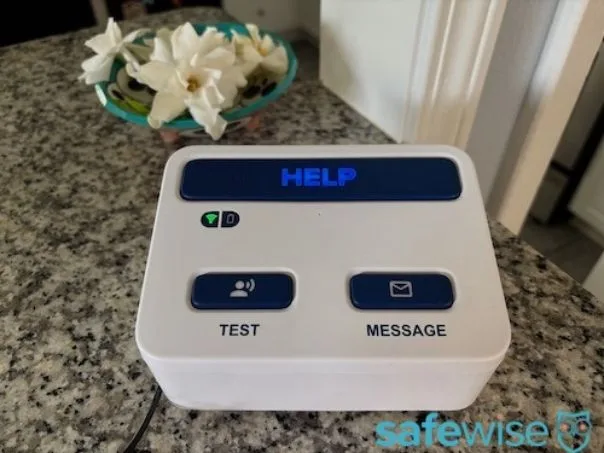
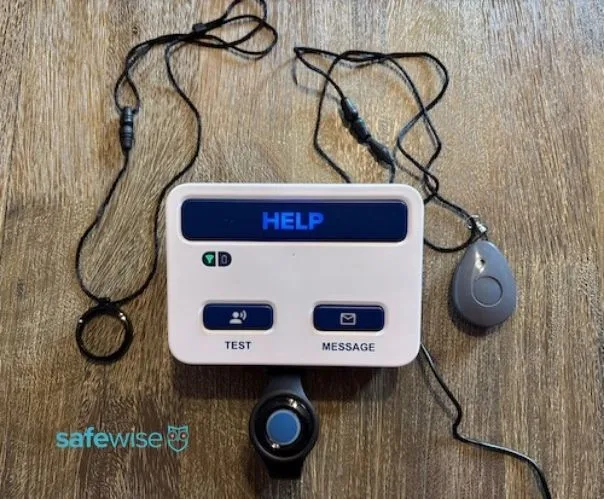
We received the above base unit when testing Lifeline, although it doesn't match the base unit pictured on the brand's website. Image: Emily Breaux, SafeWise
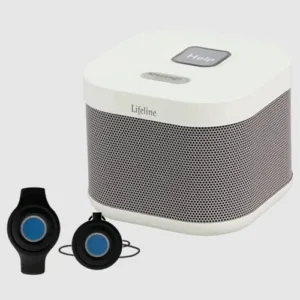
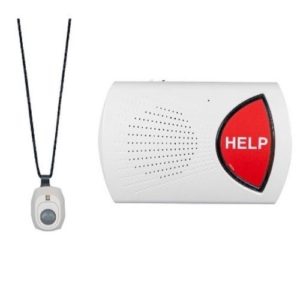
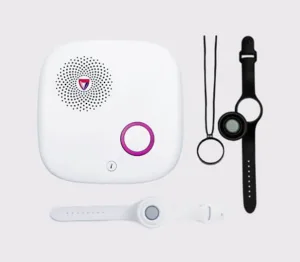
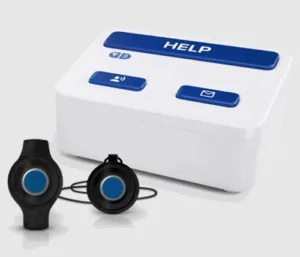
The Lifeline Home Cellular System is an at-home medical alert system. It consists of a base station with a large help button, test button, and message button (we confirmed with customer service this is for device updates, not a communication feature, unfortunately). A wearable button pairs with the base unit and comes with two holders: a wristband and a pendant.
The base station plugs into the wall and has a 30-plus-hour backup battery to keep it going during a power outage. The base station uses cell towers to communicate with the monitoring center. If you live in an area with poor cellular reception, consider a landline base station from another brand. (Lifeline no longer sells a landline system.)
The wearable button communicates with the base station through radio waves. It only triggers an emergency call when it's pressed within about 800 feet of the base station. This is considered a relatively small range for an in-home medical alert system, and we discovered the actual range is even shorter. The wearable help button connected up to 260 feet from the base unit, while the fall detection pendant only connected up to 65 feet away. Although other brands offer at-home systems with an advertised range up to 1,000 feet, 1,300 feet, and 1,400 feet from the base station, that doesn’t mean the actual range will be that far either.
The wearable button is water-resistant and safe to wear in the shower. Lifeline will automatically send you a new one when the battery gets low.
For an extra $15 per month, you can add on a fall detection pendant. We were impressed with the at-home system’s fall detection pendant: it detected all test falls, including simulated fast and slow falls.
Results from our Lifeline Home Cellular System performance tests
Fall detection response
6/6 successful fall tests.
Fall detection false alarms
A few false alarms when handling fall detection pendant. Multiple accidental calls when switching standard help button between lanyard and bracelet. False alarms can be cancelled.
GPS accuracy
N/A
Monitoring center response
Fast; 51-second average response time.
Audio quality
Loud but audio would cut off at times when speaking with agent.
Battery life
Backup battery lasted 30+ hours when base station was unplugged.
Ease of use
Lanyards have large plastic clasp that is difficult to adjust but the silicone bracelet is comfortable. Central buttons easy to press.
App interface
Unable to test.
Who should consider the Lifeline Home Cellular System?
Good for people with a larger home or yard who tend to stay home and want accurate, reliable fall detection.
Not ideal for people who often leave home alone or want more care features.
Lifeline On the Go Standard: Accurate fall detection but questionable cellular connection
Share:
Image: Emily Breaux, SafeWise
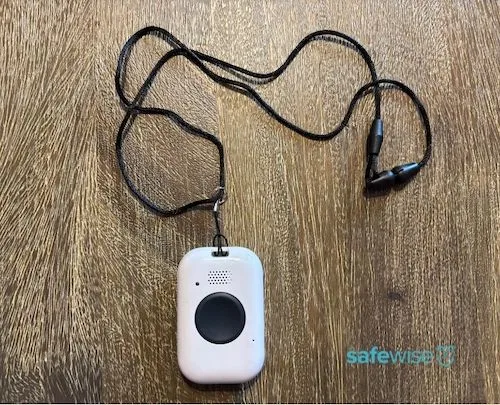
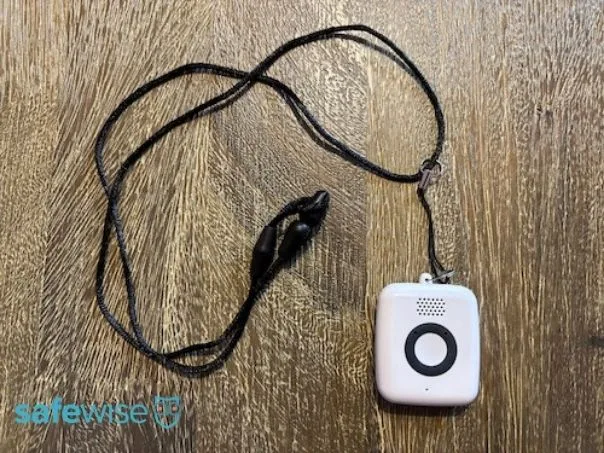
The Lifeline On the Go Standard is an older version of the On the Go Micron. It's a classic mobile necklace with a large help button and optional fall detection. Although it's not pictured on the brand's website, we confirmed with a customer service rep that it's still available.
The On the Go was the only mobile device to detect 6/6 test falls, but we still wouldn't consider it a reliable medical alert system. It didn't have service during multiple GPS location test calls, and at one point, we connected with a law office when trying to call the monitoring center. Lifeline couldn't explain why this happened, and we were just as flabbergasted.
Check out the LifeFone VIPx2 if you’re looking for a mobile necklace with accurate GPS services, reliable cellular connection, and really long battery life that lasts up to 18 days.
Results from our Lifeline On the Go Standard performance tests
Fall detection response
6/6 successful fall tests.
Fall detection false alarms
Multiple false alarms throughout testing.
False alerts are easily cancelled.
GPS accuracy
1/3 location tests accurate.
Multiple calls dropped before reaching agent to confirm location.
Monitoring center response
Good; 76-second average response time.
Audio quality
Ok; had to hold device up to ear to hear agent during some calls.
Battery life
Lasts multiple days without charge.
Ease of use
Large central button and lanyard was simple to adjust, but the plastic clasp took some effort to open and close.
App interface
Unable to test.
Lifeline On the Go Micron: Inaccurate GPS tracking and poor cellular connection
Share:
Image: Emily Breaux, SafeWise
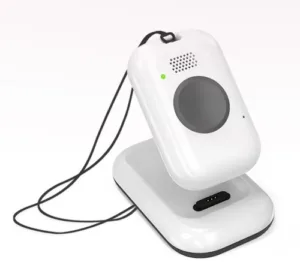
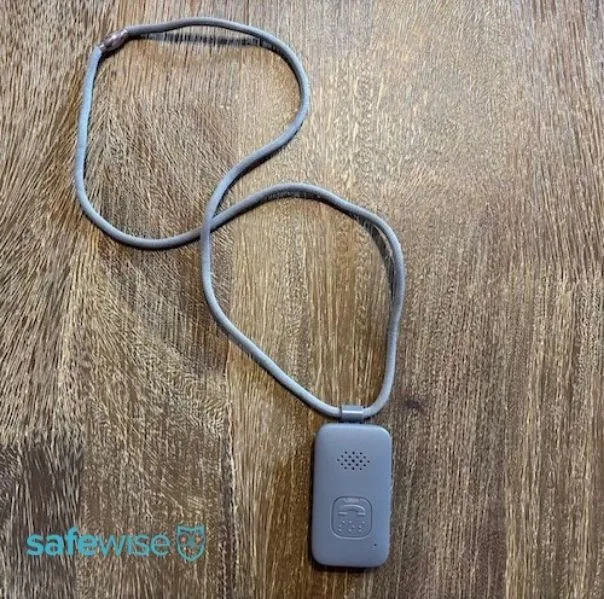
The Lifeline On the Go Micron is a mobile medical alert system that's worn around the neck. It includes a speaker and a microphone for easy two-way communication with the monitoring center. The battery lasts up to four days, which is the longest battery life of any Lifeline product.
Because it's a mobile device, it includes GPS technology. Monitoring center agents and people who have access to the caregiver app can see the device's current location.
Unfortunately, the Lifeline On the Go Micron failed our GPS location tracking tests. Only one call went through during this portion of testing, and the agent had our location at the home across the street. We were unable to connect to the monitoring center when calling from two other locations.
We can’t recommend a device with such unreliable cellular connectivity. As mentioned above, consider the LifeFone VIPx2 for a much more reliable mobile pendant.
Results from our Lifeline On the Go Micron performance tests
Fall detection response
4/6 successful fall detection tests. 2 slow falls not detected.
Fall detection false alarms
Multiple false alarms throughout testing.
False alerts are easily cancelled.
GPS accuracy
1 test located the house across the street. Other test calls dropped before reaching agent.
Monitoring center response
Ok; 98-second average response time, or a little over a minute and a half.
Audio quality
Good overall; could speak to the agent even when device was on the ground after a test fall.
Battery life
Lasts multiple days without charge.
Ease of use
Magnetic lanyard clasp is easy to use but the lanyard isn’t adjustable.
Lifeline On the Go Mini Wristband: Garbled audio and poor GPS tracking
Share:
Image: Emily Breaux, SafeWise
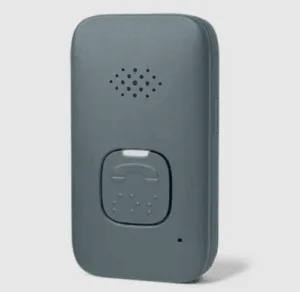
The Lifeline On the Go Mini can be purchased as a bracelet or pendant. Lifeline sent us both styles, so we reviewed them separately. The On the Go Mini is a square-shaped device with a built-in speaker and microphone. It's Lifeline's smallest and most lightweight on-the-go system, designed to be barely noticeable by the wearer or passersby.
The main difference between the On the Go Micron and the On the Go Mini is battery life. The Mini should be charged once per day, while the Micron can last up to four days on a single charge.
The On the Go Mini Wristband detected 5/6 test falls, but that’s where its solid performance ends. The mobile system only detected one correct location during our GPS tracking tests, and multiple calls dropped.
Once again, we can’t recommend a device with such unreliable cellular connectivity. If you’re looking for a reliable mobile system, consider the LifeFone Safe Watch Active or VIPx2.
Results from our Lifeline On the Go Mini Wristband performance tests
Fall detection response
5/6 successful fall tests. 1 slow fall not detected.
Fall detection false alarms
Some false alarms throughout testing.
False alerts are easily cancelled.
GPS accuracy
1/3 successful location tests.
Location was one house down for one test and other call dropped before reaching agent.
Monitoring center response
Ok; average response time was 1 minute and 44 seconds.
Audio quality
Bad; very garbled audio and difficult to communicate with agent.
Battery life
Lasts multiple days without charge.
Ease of use
Button is easy to press and silicone wristband is comfortable and simple to adjust.
Lifeline On the Go Mini Pendant: Detected 0/6 falls
Share:
Image: Emily Breaux, SafeWise
The On the Go Mini Pendant may technically be the same mobile system as the Mini Wristband, but our pendant performed much worse than the wristband. The Mini Pendant detected no test falls. We even called twice to confirm that fall detection was turned on, and it was!
Our cellular connectivity was very spotty, and multiple calls dropped or we couldn’t communicate with the agent if we even reached them. One agent hung up on us after we both asked one another a string of “whats” when trying to determine our GPS location.
We can’t recommend such a poor-performing, unreliable mobile system. We recommend one of LifeFone's mobile systems as a reliable alternative we've tested.
Results from our Lifeline On the Go Mini Pendant performance tests
Fall detection response
0/6 successful fall tests.
Fall detection false alarms
Some false alarms throughout testing.
False alerts are easily cancelled.
GPS accuracy
1/3 successful location tests.
Other test calls dropped before reaching agent.
Monitoring center response
Good; 77-second average response time, or slightly over 1 minute.
Audio quality
Bad; very garbled audio and difficult to communicate with agent.
Battery life
Lasts multiple days without charge.
Ease of use
Had to use force to press and hold help button and plastic lanyard clasp was difficult to open and close.
App interface
Unable to test.
Lifeline Smart Watch: Limited features but most reliable out of mobile systems
Share:
Image: Emily Breaux, SafeWise
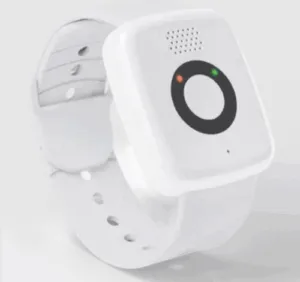
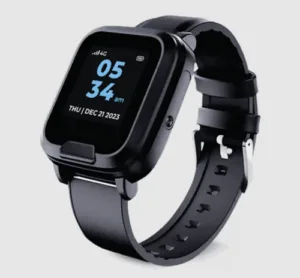
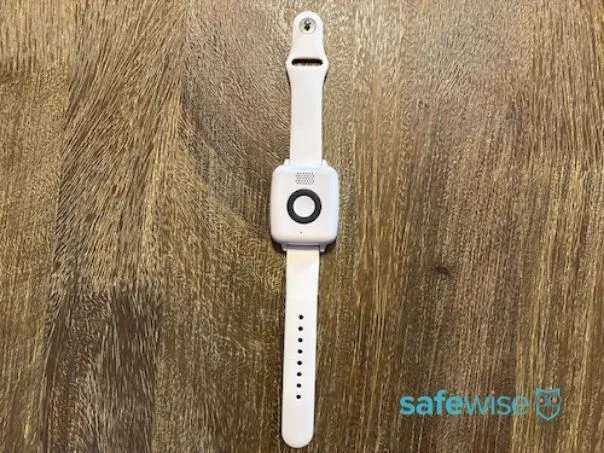
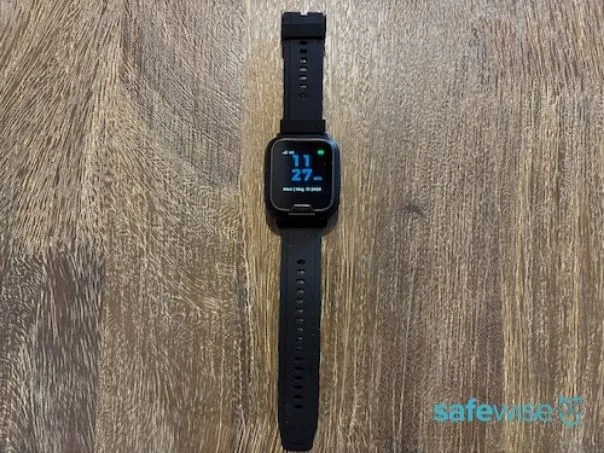
The Lifeline Smart Watch functions as a watch, medical alert device, step counter, and heart rate monitor. Like all other Lifeline devices, the Smartwatch is waterproof, so it can be worn in the shower, bath, or rain.
The touchscreen was responsive, but the help button was small and blended in with the watch face’s frame. Some users with limited mobility may find it hard to press the button, and we wish it stood out against the rest of the watch.
While Lifeline’s medical alert watch has more limited features than some brands, it stood out as the most reliable of the five Lifeline mobile devices we tested. The Smart Watch detected more than half of falls, detected 2/3 correct locations, and only one call dropped (but the agent called us back right away). The watch’s speaker was also much louder and clear than the other mobile systems.
In an emergency, one dropped call is one too many, but we were relieved when the agent called us back. If we had to recommend a Lifeline mobile device, the Smart Watch would be it, but we think there are much more reputable, reliable, and affordable medical alert watches out there, such as the LifeFone Safe Watch Active.
Results from our Lifeline Smart Watch performance tests
Fall detection response
4/6 successful fall tests. 2 fast falls not detected.
Fall detection false alarms
Multiple false alarms throughout testing.
False alerts are easily cancelled.
GPS accuracy
2/3 correct location tests, but 1 call dropped and agent called back.
Monitoring center response
Fast; 51-second average response time.
Audio quality
Excellent. Audio loud and clear for most calls.
Battery life
Lasts multiple days without charge.
Ease of use
Help buttons is small and blends with the touchscreen’s frame. Silicone watch band has large clasp and is easy to adjust.
App interface
Unable to test.
Who should consider the Lifeline Smartwatch
Great for active people or budget-conscious buyers.
Not ideal for people who may not want to charge a device every day or who get skin irritation from wearing a wristband.
Overall, Lifeline has good customer service overwhelmingly positive ratings. Lifeline has earned an average rating of 4.5 out of 5 stars from more than 6,200 customer reviews on sites like Trustpilot and the Better Business Bureau. That makes it one of the highest-rated medical alert companies on the market.
This is why our poor interactions with some monitoring agents surprised us. As mentioned in our monitoring center response results, a few agents seemed agitated or were short with us. During one interaction, we were cut off mid-sentence multiple times, and the agent hung up before we could ask a follow-up question.
Other agents were friendly and ready to help, and our experience with customer service representatives was very positive. Reps were knowledgeable, friendly, and helpful.
A real Lifeline review
"I have had Lifeline since a terrible fall years ago. Then I had multiple surgeries which made me more vulnerable to falling. I have had to use Lifeline several times and the response is quick and the person answering is kind and professional. Unfortunately, I hit the button around my neck by accident many times since it is sensitive (which is a good thing). The staff always is kind even when I call them by accident. I recommend this service to everyone in need."
Negative reviews sometimes mention problems with device quality. Some people have experienced false alarms while not wearing the device. Some have been disappointed by poor speaker quality, which mirrors our own experiences.
Other unhappy customers cite cancelation problems as the reason for their one-star review. Cancelation is a common pain point in the medical alert industry. With Lifeline, you don't own the equipment. It must be returned in order for your cancellation to be processed. If you don't return the equipment, you will be charged a replacement fee if $350. Still, that doesn't excuse ongoing charges that continue for months or years, as some people claim.
Although some people experience issues with Lifeline, the vast majority are happy with its devices and service.
Lifeline's refund and return policies
Lifeline doesn't advertise this very well, but you commit to paying for at least three months of monitoring when you complete your purchase. This is true even if you pay month to month.
However, Lifeline's website outlines a 15-day trial period. You get a refund if you cancel within 15 days of ordering. It may not be a full refund due to the $50 restocking fee. You're also expected to send all the equipment back in excellent condition. Failing to do so could result in a charge of $350.
Lifeline FAQ
Yes, you may be eligible for a free medical alert system from Lifeline if you're enrolled in one of the following Medicare plans:
Humana Medicare Advantage
TRS-Care Medicare Advantage
UnitedHealthcare Medicare Advantage
Check your Medicare plan's Explanation of Benefits (EOB) document to see if you have coverage for a Lifeline alert.
Yes, AARP members get a 15% discount on Lifeline's monthly monitoring fee. The activation fee ($50 value, often combined with the $49.95 programming fee to create a $99.95 "setup fee") and shipping fees are also waived.
The Medical Alert brand is almost identical to the Lifeline brand. They are owned by the same parent company (Connect America) and sell the same mobile devices. Their home systems have the same specs but feature a slightly different base design. Medical Alert tends to be the more affordable choice, but Lifeline is the only option with an AARP discount.
How we reviewed Lifeline medical alerts
Share:
Image: Emily Breaux, SafeWise
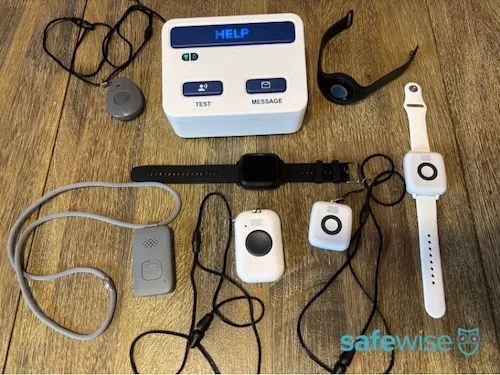
We tested the Home Cellular System, On the Go Standard (older model), On the Go Micron, On the Go Mini Wrist, On the Go Mini Pendant, and Smart Watchto offer readers a first-hand review based on our actual experience with Lifeline. Our devices weren’t activated when they arrived, which allowed us to set up the systems ourselves, just as most customers would. Lifeline sent these devices to us for free, and we returned them after testing.
Here’s how we tested each device:
Wore devices to note comfort, convenience, and how easy it is to adjust wristband or lanyard.
Tested the at-home base unit range by conducting test calls from the advertised 800-foot range as well as multiple distances from the base station.
Simulated fast, hard falls by dropping devices from shoulder height to test fall detection.
Simulated slow, gradual falls by dropping devices in a rolling motion to test fall detection.
Practiced cancelling multiple calls.
Conducted test calls to the monitoring center and timed how long until we reached an agent.
Placed test calls in multiple locations and asked the agent to confirm our GPS location.
Fully charged devices and observed battery life with normal use.
Called customer service multiple times.
Lifeline has an in-depth website with information about its equipment, policies, and pricing. So, we read all of it. We combed through product manuals, customer reviews, fine print, and more to get a complete picture of what it’s like to be a Lifeline customer before creating this review.
We also spoke directly to Lifeline to make sure we provided accurate information about its policies. We read customer reviews on Trustpilot, Consumer Affairs, and Better Business Bureau.
To learn more about our policies for reviews and articles like this one, read ourfull methodology.
Final word: We don't recommend Lifeline
While Lifeline has a long-standing reputation as a high quality medical alert company with helpful customer service, responsive and kind monitoring center agents, and well-designed devices, we had an overall poor experience when using Lifeline medical alert systems.
Mobile devices were unreliable and didn't reach the monitoring center during multiple calls, we had a hard time communicating with agents, and one device detected 0/6 test falls.
We can't recommend Lifeline medical alert systems due to its poor performance and overall unreliability.
Consider LifeFone as a reliable and more affordable alternative to Lifeline. Check out our LifeFone review to learn more about this rival brand's impressive performance and caregiver features. As we test more systems, we'll update this review with more recommended alternatives. The LogicMark Freedom Alert Max also performed well in our tests.
Emily is passionate about creating helpful, informative content that empowers readers to make more informed decisions about their health, safety, and homes. Since 2022, she’s tested and researched 30+ medical alert systems and written countless product reviews and buying guides to help shoppers navigate the senior safety space.
Emily earned a B.A. in English Secondary Education from Louisiana State University and holds a certificate in gerontology from Delgado Community College. When she’s not writing, she enjoys neighborhood walks, yoga, performing in local musical theatre, and finding her next read. Emily lives in New Orleans with her husband and daughter.








 18 min read










 Your Privacy Choices
